Lock Report by User
Introduction
For some reason, the company managers wish to let users to check and view the report by themselves. They cannot access other users data, eg. agent A cannot see agent B sales value. Therefore, we have come out this script to lock at the report according to the user rights.
Updates
Last Customisation Update : 07 Nov 2015
Criterias
[Tools | Maintain User...]
-
Advanced Lock in Maintain User.
Types Field Name Data Types Length Usage STD Code String 20 User ID, eg. LEE STD Name String 100 User Name DIY-F Agent_Lock Boolean False value: 0, True value: 1 To lock the agent parameter in report DIY-F Agent String 10 Set an agent code to lock to this user DIY-F Location_Lock Boolean False value: 0, True value: 1 To lock the location parameter in report DIY-F Location String 10 Set a location code to lock to this user -
The above DIY fields are created at Tools | DIY | Maintain_DIY(link)
Reporting
-
As long the report parameter has Project, Agent, Area, or Location, the reports able to lock based on user login. For instances:
- Customer Aging (Agent, Area, Project)
- Sales/Purchase Document Listing (Agent, Area, Doc Project)
- Outstanding Sales/Purchase Document Listing (Agent, Area, Doc Project, Item Project, Location)
- Stock Card (Location)
- etc...
-
Insert and update the following DIY Script into Script tab (Report name - Param Form) in Tools | DIY | Maintain DIY
For instance, apply the below script into Sales Profit & Loss By Document - Param Form.
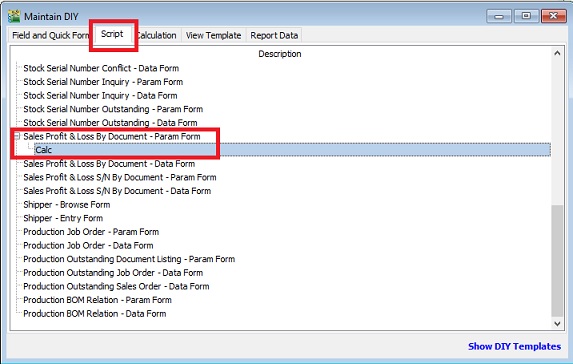
uses SysUtils, Dialogs, Forms, ComObj, DBClient;

var C, D : TWinControl;
    FComServer, lBizObj : Variant;
    lLock, lLock2 : Boolean;
    L, P : TStringList;

function ComServer: Variant;
begin
  if FComServer = Null then begin
      FComServer := CreateOleObject('SQLAcc.BizApp');
  end;
  Result := FComServer;
end;

procedure CheckLock;
var cdsTemp : TClientDataset;
    lSQL : String;
begin
  lLock := False;
  lLock2 := False;
  FComServer := null;
  cdsTemp := TClientDataset.Create(nil);
  lSQL := Format('SELECT UDF_Location_Lock, UDF_Agent_Lock, UDF_Agent, UDF_Location FROM SY_USER WHERE Code=%s',[QuotedStr(UserID)]);

  try
    cdsTemp.Data := ComServer.DBManager.Execute(lSQL);
    if cdsTemp.RecordCount > 0 then begin
      lLock := cdsTemp.FindField('UDF_Location_Lock').Value = 1;
      L.Text := cdsTemp.FindField('UDF_Location').AsString;
      lLock2 := cdsTemp.FindField('UDF_Agent_Lock').Value = 1;
      P.Text := cdsTemp.FindField('UDF_Agent').AsString;
    end;

  finally
    cdsTemp.Free;
    FComServer := null;
    end;
end;

begin

  C := Self.FindChildControl('edLocation_Panel') as TWinControl;
  D := Self.FindChildControl('edAgent_Panel') as TWinControl;
  L := TStringList.Create;
  P := TStringList.Create;

  CheckLock;
  try
    if C <> nil then C.Enabled := not lLock;
      if lLock then begin
      C := TWinControl(C).FindChildControl('edLocation_Edit') as TWinControl;
      (C as TControl).SetTextBuf(L.CommaText);
    end;

    if D <> nil then D.Enabled := not lLock2;
      if lLock2 then begin
      D := TWinControl(D).FindChildControl('edAgent_Edit') as TWinControl;
      (D as TControl).SetTextBuf(P.CommaText);
    end;

  finally
    L.Free;
    P.Free;
  end;
end.