Maintain Tax
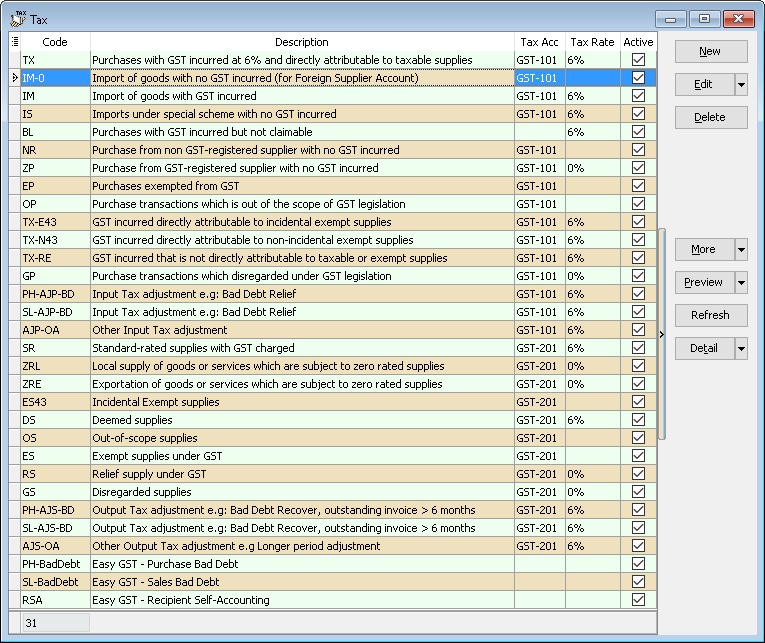
- This to Maintain all the available tax given by Government or user can self add or modified
Create New Tax
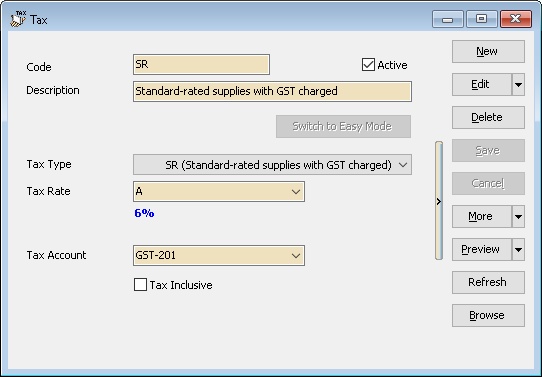
- Screenshot below is the Maintain Tax entry form.
| Field Name | Explanation & Properties |
|---|---|
| Code | Enter the tax code to be shown in report. |
| Active | - Checked: Active & able to select from the Tax List in data entry. |
| - UnChecked: InActive & unable to select from the Tax List in data entry. | |
| Description | Enter the tax description. |
| Tax Type | Select the Tax Type for the Tax Code to be created. |
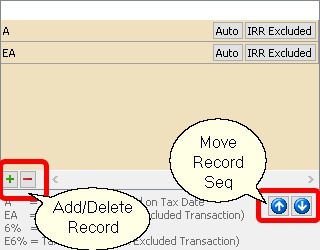
| Tax Rate | User can self-determine the rate or set Auto: |
| - A: Auto Tax Rate. System will auto change to new rate if there is update in GST Rate (must update SQL Accounting). | |
| - E: Excluded from IRR calculation (useful for OS Tax Code & Mixed Supplies Industry). | |
| - EA: Combination of A & E. | |
| - 6%: User-defined fixed rate (e.g., 6%). | |
| - E6%: Fixed rate excluded from IRR calculation. | |
| Default 1st row is the Default selection in data entry. | |
| Tax Account | Select an appropriate GL Account from Maintain Account. |
| Tax Inclusive | - Checked: Default is Tax Inclusive. |
| - UnChecked: Default is Tax Exclusive. |
Use of Tax
- You can set the tax as default at the following
- GL | Maintain Account...
- Customer | Maintain Customer... | Tax
- Supplier | Maintain Supplier... | Tax
- Stock | Maintain Stock Item... | Output Tax/Input Tax
- Tools | Options | Customer | Default Output Tax
- Tools | Options | Supplier | Default Input Tax
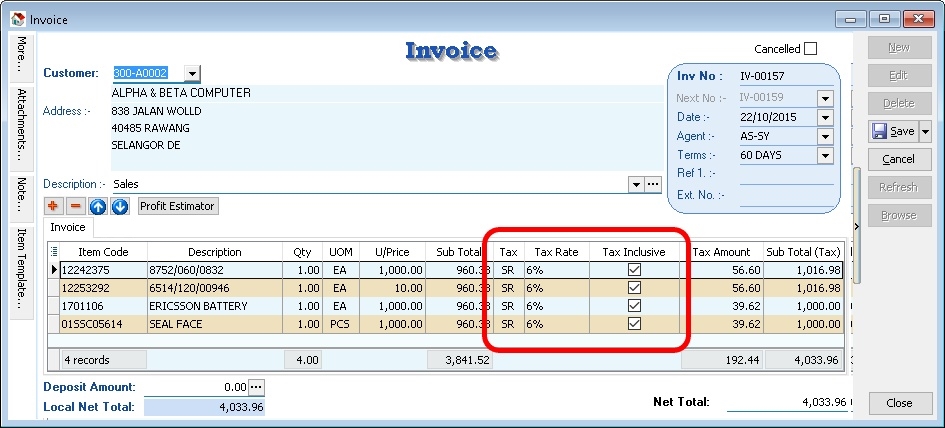
- Therefore, item inserted will be automatically calculate the tax amount based on the subtotal. See below screenshot.
Default System Tax Seq
Default System Tax Seq are as follow
For Sales & Purchase
- Maintain Customer/Supplier
- Maintain Item Code
- Tools | Options | Customer/Supplier => For Version 836.761 & below
- Maintain Tax with IsDefault is Tick => For Version 837.762 & above
For AR & AP
- Maintain Customer/Supplier
- Maintain Account
- Tools | Options | Customer/Supplier => For Version 836.761 & below
- Maintain Tax with IsDefault is Tick => For Version 837.762 & above
For GL
- Maintain Account