Reports
Print GST Listing
To generate a summary and details of the GST transactions after process the GST Returns. It is easy to cross check against with GST-03.
GST Listing
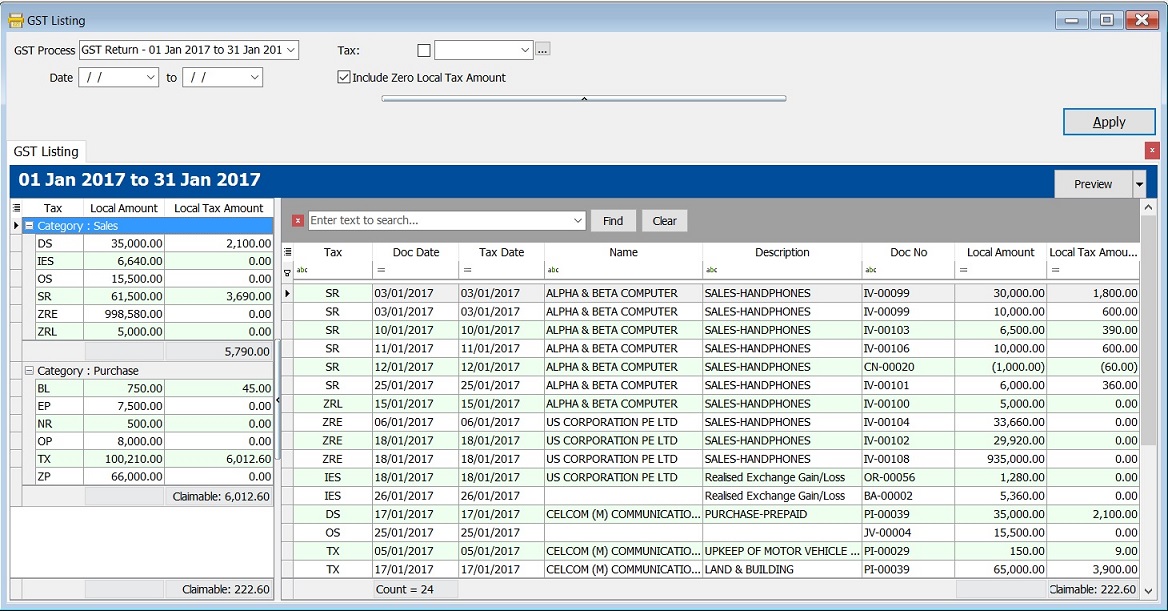
GST Listing - Parameter

| Parameter | Type | Explanation |
|---|---|---|
| GST Process | Lookup | To select the GST Process period. |
| Date | Date | To range the date to retrieve the data after apply it. |
| Tax | Lookup | To select the tax code. |
| Include Zero Local Tax Amount | Boolean | To show the zero local tax amount. |
GST Listing - Summary
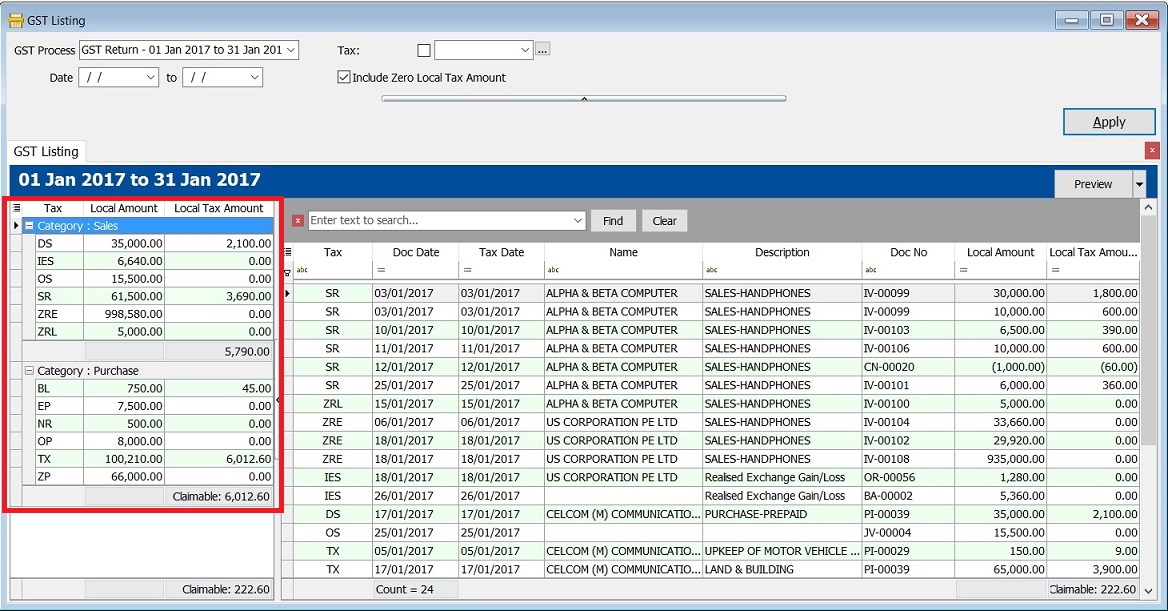
-
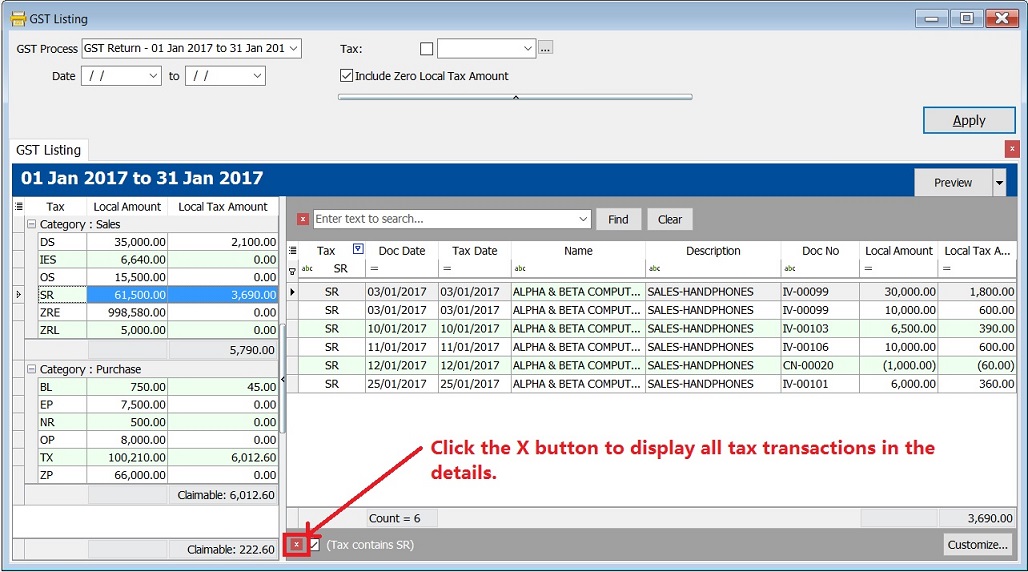
Double click on the tax code (eg. SR) in the Summary.
-
It will auto filter the GST transactions by tax code (SR) in the Details.
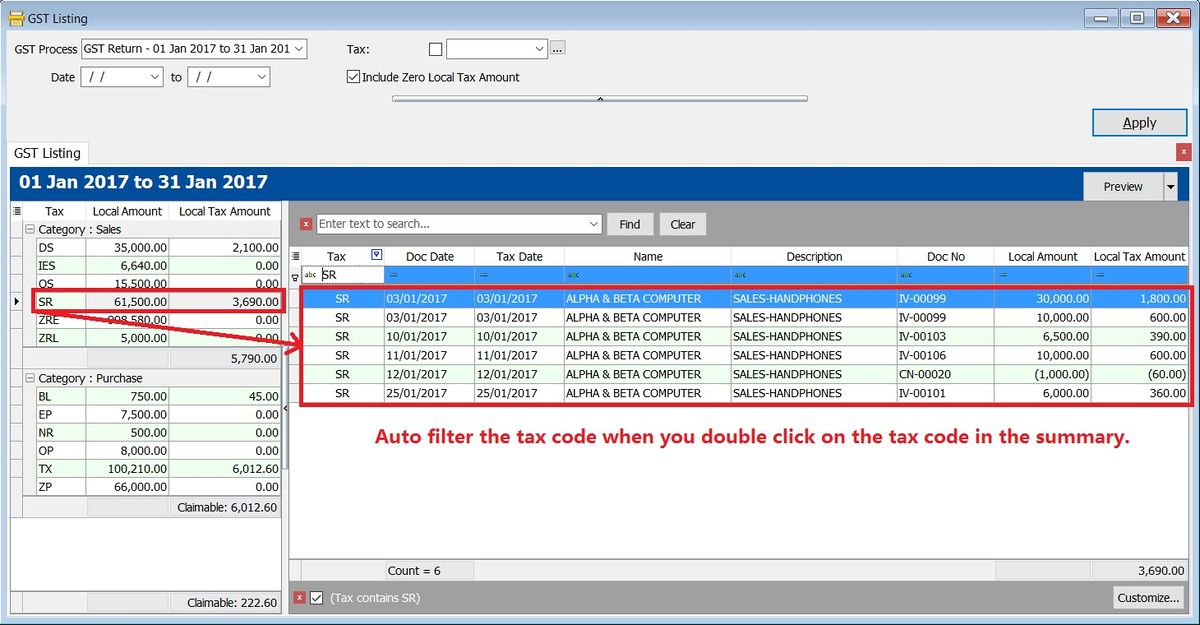
-
Deselect the tax code (SR), click on the X button. See the screenshot below.
GST Listing - Detail
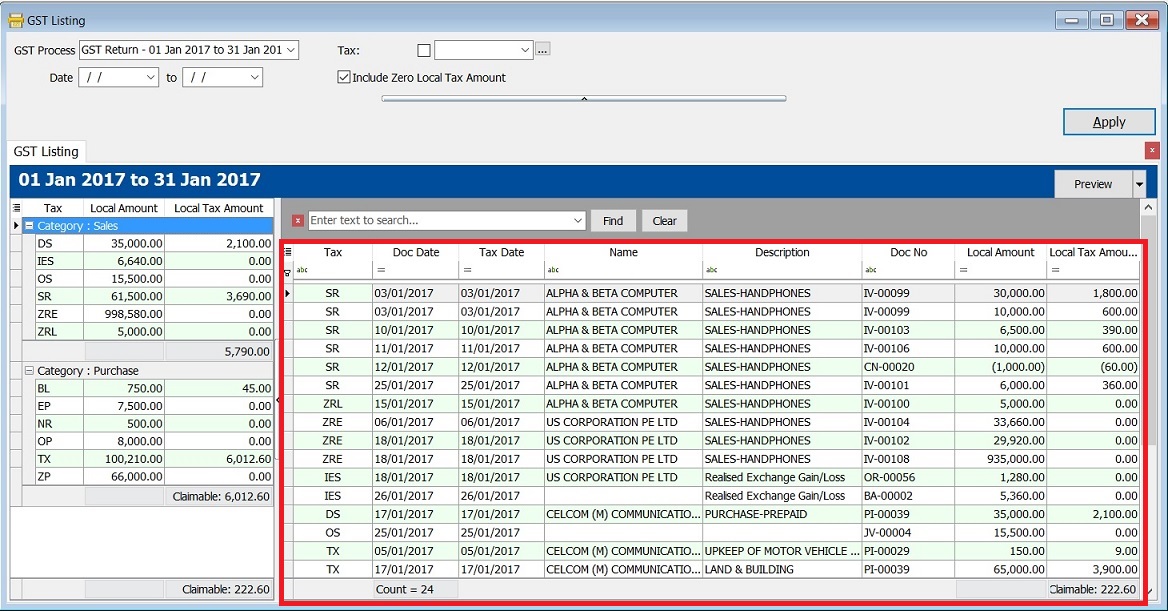
-
Find Panel is very useful to search in any columns by the keywords entered by you.

-
It helps to search the transactions contain the keywords, eg. "UPKEEP", "TX" or "ZP". You just need to enter the keywords directly with a space in between each keywords. See the screenshot below.
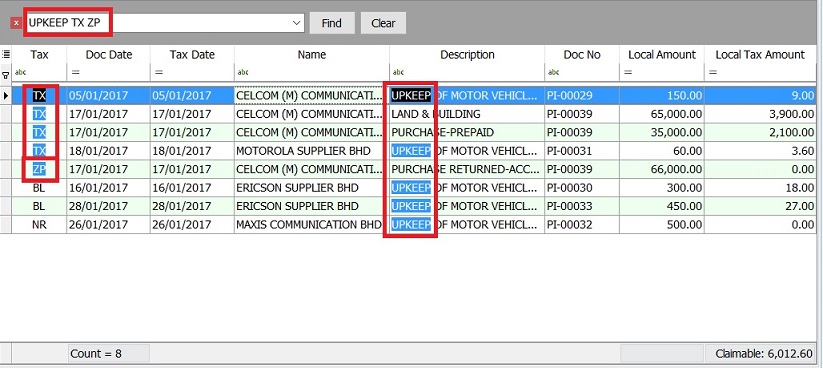
Find Panel Helper
-
With this function, you can easily narrow down the search to identify the errors before the GST Returns submission.
-
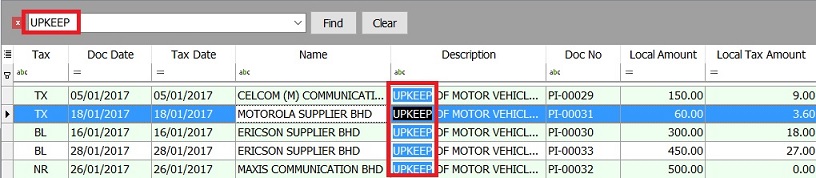
Let say I wish to find the word UPKEEP.
-
Type the UPKEEP in the find panel.
-
If you want to exclude the BL tax code, then you have to enter as UPKEEP -BL in the find panel.

Explanation of Extended Search Syntax :
| Example Search Syntax | Filter Operator | Explanation |
|---|---|---|
| apple pineapple mango | OR | Any transaction lines containing apple, pineapple, OR mango will be searched. |
| apple +pineapple | AND | Transaction lines with a combination of apple AND pineapple will be searched. |
| apple -mango | EXCLUDE | Transaction lines with the word apple but EXCLUDE mango. Result: apple and pineapple will be searched. |
| "pineapple apple" | EXACT WORD | Search for the exact words "pineapple apple". |
Spacing is very important to make your search more accurate.
Reports
-
Click on Preview.
-
Select a report to preview or print or export.
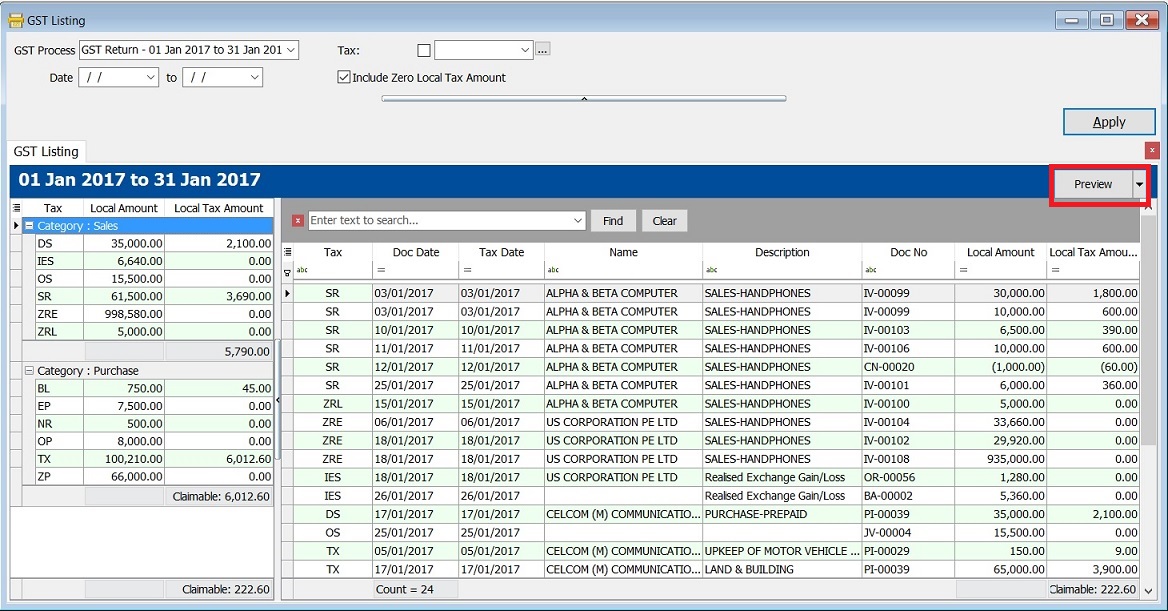
No. Report Name Purpose 01 GST Detail 1 To show the document description in GST Listing. 02 GST Detail 2 To show the document item details description in GST Listing. 03 GST Detail 3 - GST F5-(SG) For Singapore GST, to show the GST-03 details in GST Listing. 04 GST Detail 3 - GST-03 For Malaysia GST, to show the GST-03 details in GST Listing. 05 GST Detail 4 - Mixed Supplies Applicable to Mixed Supplies. To show the calculations for DmR and Longer Period Adjustment. 06 GST Lampiran 2 GST detail listing for standard rated. It is upon request by RMCD. 07 GST Lampiran 2-with ZR Another GST detail listing for the standard rated and zero rated separately. 08 GST Lampiran 4-Ringkasan Maklumat Permohanan Tuntutan Pelepasan Hutang Lapuk Lampiran 4 as requested by Kastam Officer. 09 GST Listing - Yearly GST Analysis To analyze the yearly tax amount and taxable amount. 10 GST Summary Sheet - MY GST Summary Sheet format. 11 GST-Lampiran B-0 PT GST Bil 2B (ATS) (IS) A special GST detail listing for Approved Trader Scheme (Refer to GST-03 item 14 & 15). 12 GST-Penyata Eksport (ZRE) A special GST detail listing for Zero Rated Export supply (Refer to GST-03 item 11). 13 GST-Penyata Pembekalan Dikecualikan (ES & IES) A special GST detail listing for Exempted Supplies (Refer to GST-03 item 12). 14 GST-Penyata Pembekalan Tempatan Berkadar Sifar (ZRL) A special GST detail listing for Zero Rated Local supply (Refer to GST-03 item 10). NOTE:From Doc Types in GST Listing Detail are consists of:
- _A = Un-claimable Non-Incidental Exempt Supplies (TX-N43)
- _B = Un-claimable TX-RE
- _C = Annual Adjustment Non-Incidental Exempt Supplies (TX-N43)
- _D = Annual Adjustment TX-RE
- _X = Realized Gain Loss
Pivot Table
-
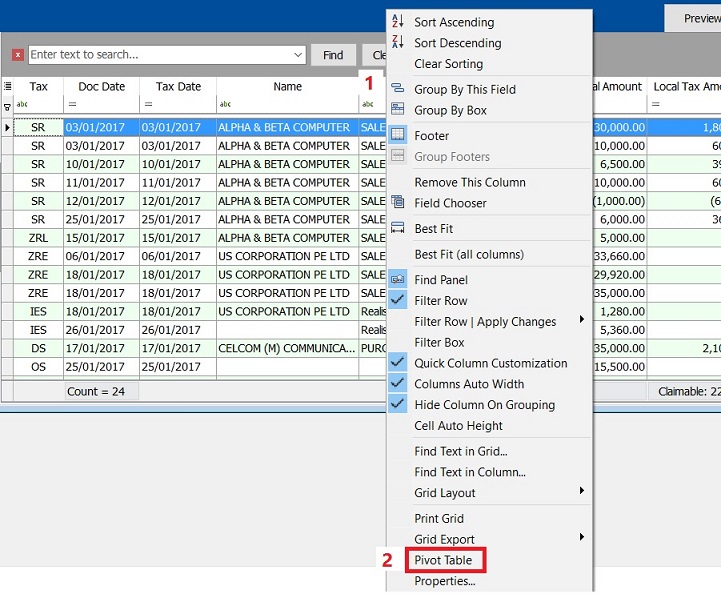
Right click on any of the grid columns.
-
From the menu, select Pivot Table.
-
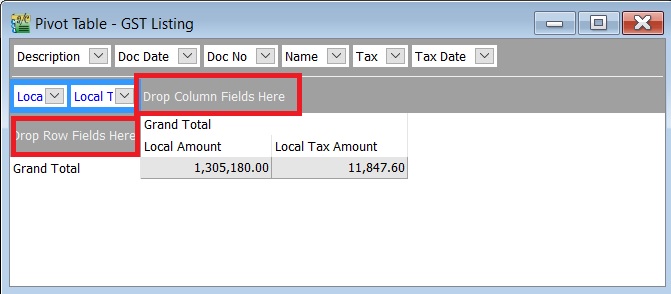
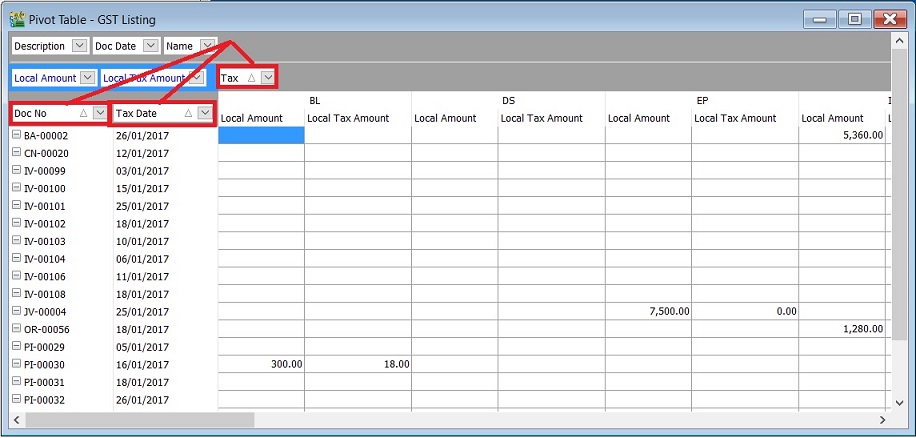
At Pivot Table, there are 3 sections as below:
a. Data Fields – Data field will auto inserted when you launch the pivot table.
b. Row Fields – To structure the grouping for Rows.
c. Column Fields – To structure the grouping for Columns.
-
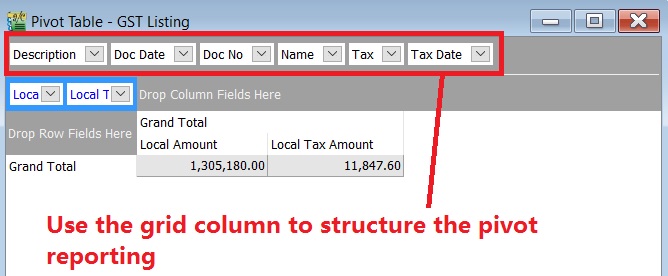
Use the grid columns to structure the pivot format. See the screenshot below.
-
Drag the grid column into Row fields or Column fields.
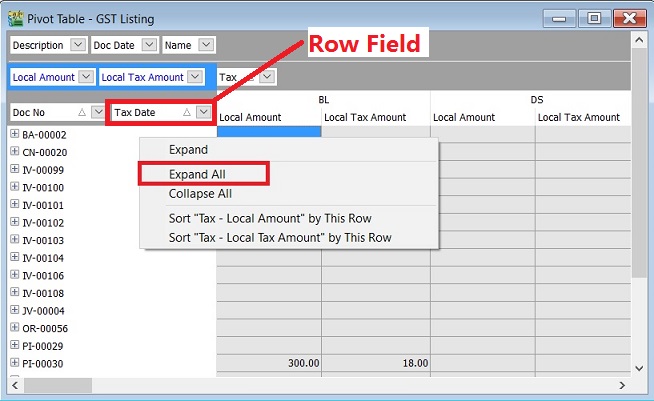
- Right click on the Row Field
- Select Expand All.
- Right click on the grey area.
- A small menu pop out.
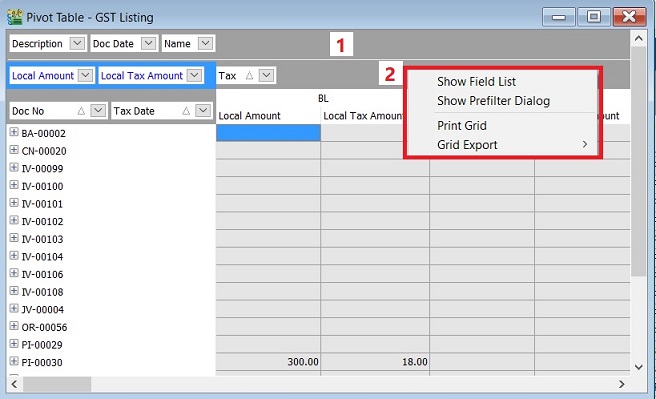
- Show Field List - Not really use to it.
- Show Pre-filter Dialog - Insert filter conditions.
- Print Grid - To print the grid.
- Grid Export - To export the grid data into EXCEL, TEXT, HTML and XML.
Print GST - 03
To generate the GST-03 data for submission via TAP.
GST - 03
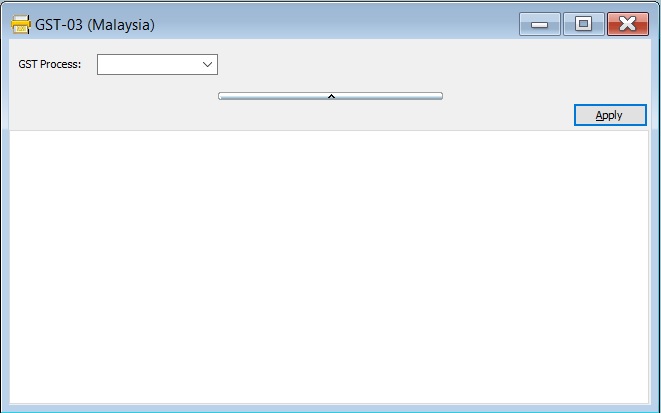
GST-03-Parameter
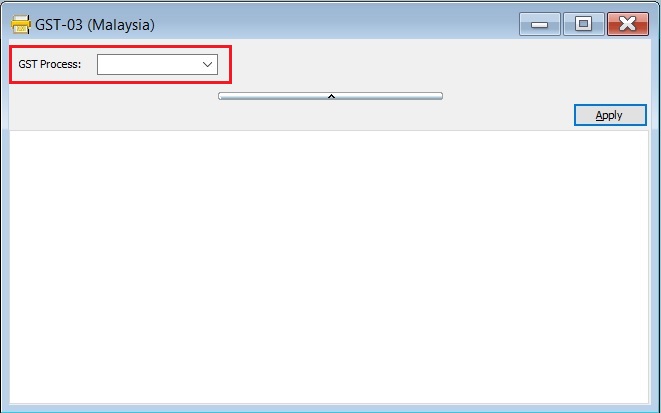
| Parameter | Type | Explanation |
|---|---|---|
| GST Process | Lookup | To select the GST Process Period. |
See example of the GST Process Lookup screenshot below.
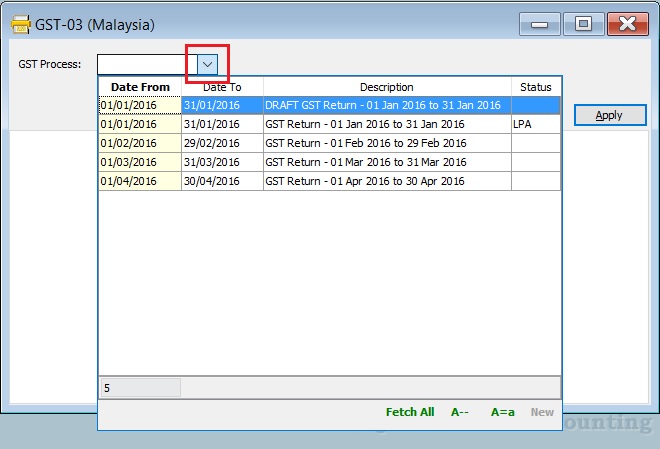
GST-03 Form
-
After select the GST Process parameter, click on APPLY.
-
See the below screenshot.
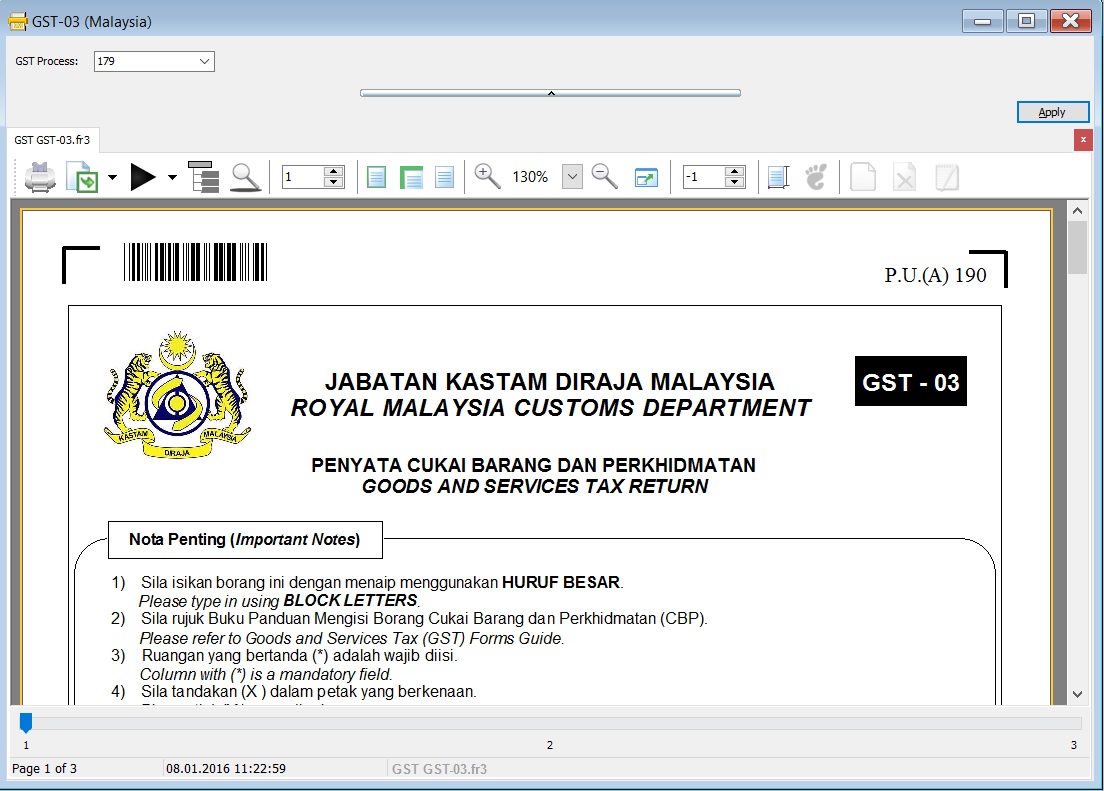
GST-03 TAP Upload File
-
At the GST-03 on the screen, click on the PLAY button.
-
Click on GST03_TAP. See the below screenshot.
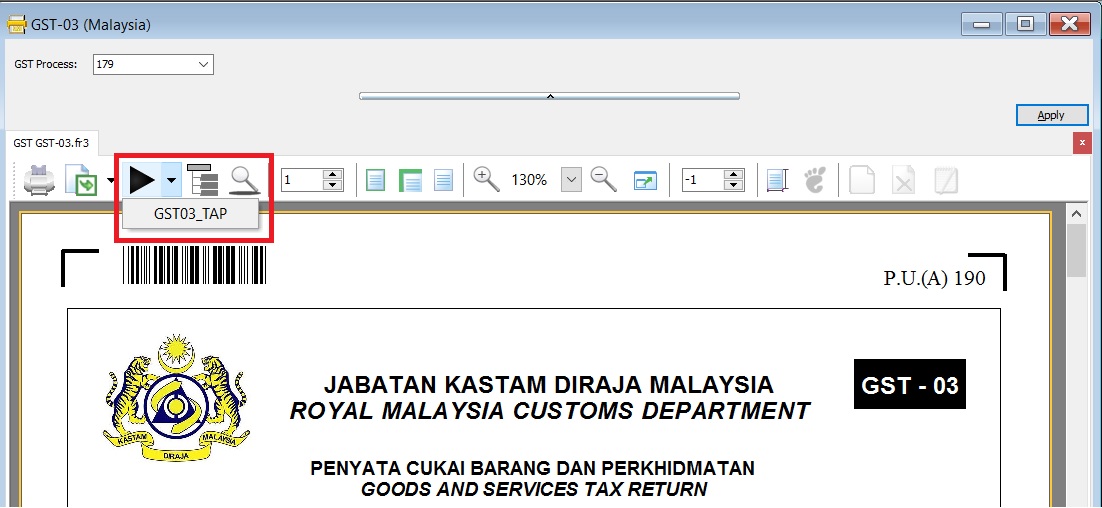
-
Select the destination directory to save the TAP-Upload text file, eg. GST Tap Return for Oct 2015 the filename: GSTTapReturn-201510.
-
Click on SAVE.
-
See the below screenshot.
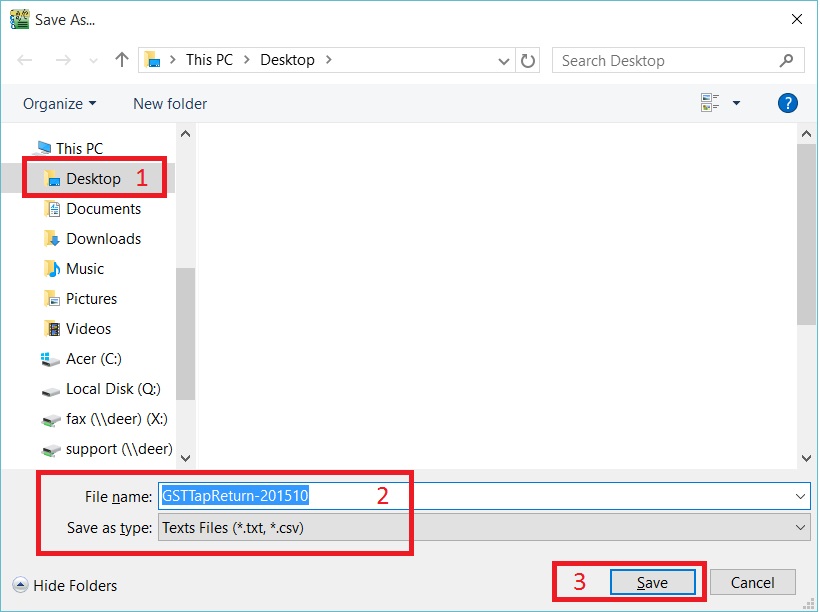
-
Prompt the below message. Press OK to proceed to upload the file via TAP website.
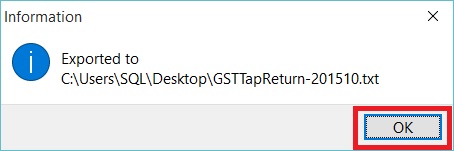
GST - 03 Item Details
Original source from RMCD website: GST-03 Guidelines from RMCD website
PART A : DETAILS OF REGISTERED PERSON
| Item No. | Description | Guidelines |
|---|---|---|
| 01 | GST No.* | GST No from File → Company Profile... |
| 02 | Name of Business* | Company Name from File → Company Profile... |
PART B : DETAILS OF RETURN
| Item No. | Description | Guidelines |
|---|---|---|
| 03 | Taxable Period* | GST Returns – Process date range. |
| 04 | Return and Payment Due Date* | Follow the RMCD due date. |
| 05a | Output Tax – Total Value of Standard Rated Supply* | SR + DS (Taxable Amount) |
| 05b | Output Tax – Total Output Tax (Inclusive of Tax Value on Bad Debt Recovered & other Adjustments)* | SR + DS + AJS (Tax Amount) |
| 06a | Input Tax – Total Value of Standard Rate and Flat Rate Acquisitions* | TX + IM + TX-E43 + TX-RE |
| 06b | Input Tax – Total Input Tax (Inclusive of Tax Value on Bad Debt Relief & other Adjustments)* | TX + IM + TX-E43 + TX-RE + AJP (Tax Amount) |
| 07 | GST Amount Payable (Item 5b – Item 6b)* | Output Tax Value > Input Tax Value |
| 08 | GST Amount Claimable (Item 6b – Item 5b)* | Input Tax Value > Output Tax Value |
| 09 | Do you choose to carry forward refund for GST? | Mark X on YES if you have ticked C/F Refund for GST. |
PART C : ADDITIONAL INFORMATION
| Item No. | Description | Guidelines |
|---|---|---|
| 10 | Total Value of Local Zero-Rated Supplies* | ZRL + NTX (Taxable Amount) |
| 11 | Total Value of Export Supplies* | ZRE + ZDA (Taxable Amount) |
| 12 | Total Value of Exempt Supplies* | IES + ES (Taxable Amount) |
| Note: Net Loss in Forex (IES) = 0.00 | ||
| 13 | Total Value of Supplies Granted GST Relief* | RS (Taxable Amount) |
| 14 | Total Value of Goods Imported Under Approved Trader Scheme* | IS (value excluding tax) |
| 15 | Total Value of GST Suspended under item 14* | IS x 6% (value of tax) |
| 16 | Total Value of Capital Goods Acquired* | TX + TX-CG + IM (value excluding tax) |
| Note: Regardless of purchase asset value. Purchase doc/Cash Book PV/ JV using "Fixed Asset" GL Account (exclude Block Tax). | ||
| 17 | Total Value of Bad Debt Relief Inclusive Tax* | AJP (value including tax) – Only Debtor (106 x AJP Input Tax / 6) |
| 18 | Total Value of Bad Debt Recovered Inclusive Tax* | AJS (value including tax) – Only Debtor (106 x AJS Input Tax / 6) |
| 19 | Breakdown Value of Output Tax in accordance with the Major Industries Code | Picks from GL Accounts that need MSIC Code: Sales Account, Cash Sales Account, Return Inwards, etc. |
| MSIC Code is a 5-digit code representing your business nature. | ||
| Used in Form GST-03 (Item 19). | ||
| The total GST amount of the respective MSIC Codes will be shown. | ||
| Others will be filled automatically if exceeding 5 MSIC codes. | ||
| Refer to list of MSIC 2008. |
PART D : DECLARATION
| Item No. | Description | Guidelines |
|---|---|---|
| 20 | Name of Authorized Person* | User name from Tools -> Maintain User... |
| 21 | Identity Card No.* | IC (New) from Tools -> Maintain User... (Misc tab) |
| 22 | Passport No.* | Passport from Tools -> Maintain User... (Misc tab) |
| 23 | Nationality* | Nationality from Tools -> Maintain User... (Misc tab) |
| 24 | Date | Process Date |
| 25 | Signature | Sign on GST-03 print copy. |
Column with (*) is a mandatory field.
Generate GST Audit File (GAF)
To generate the GST Audit File (GAF) upon RMCD request. Source from: RMCD - GAF Guilde
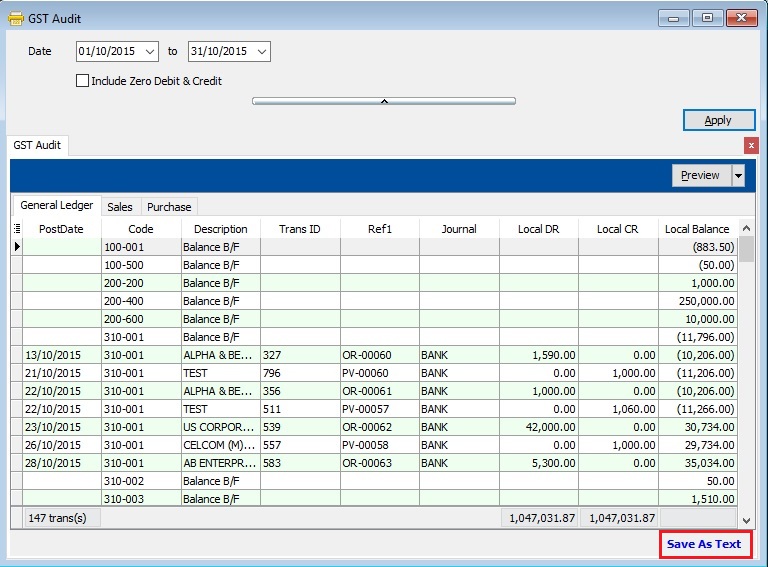
GST Audit File (GAF)
GST Audit File (GAF) has break into 3 parts:
- General Ledger
- Sales
- Purchase
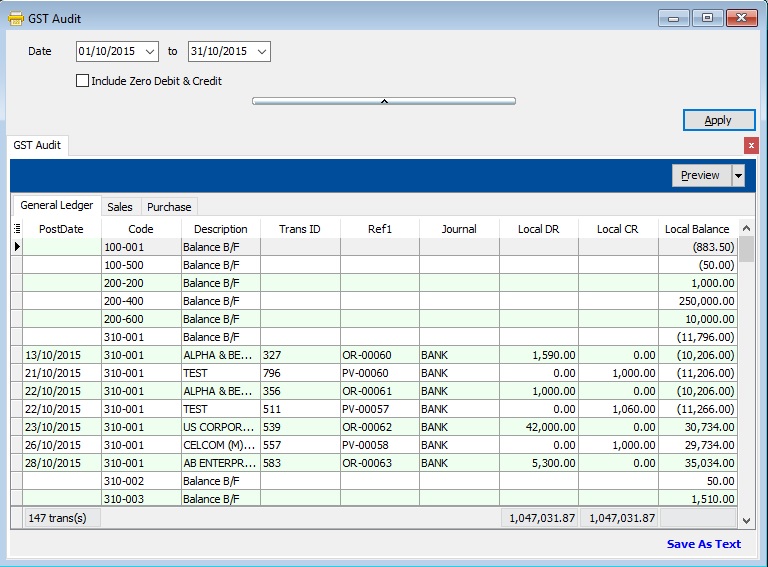
How to Export the GAF File?
-
Select the date range.

-
Click on APPLY.
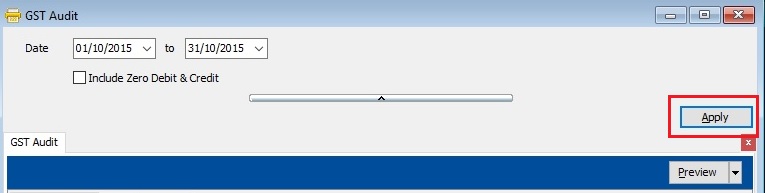
-
Click on Save As Text.
-
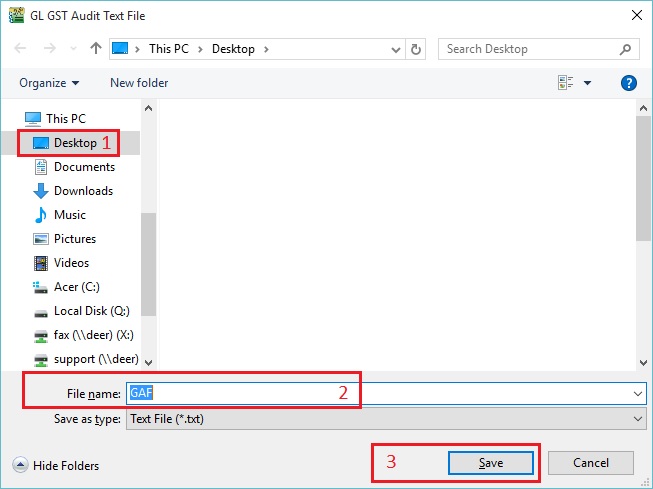
Select the destination directory to save the GAF file. See the below screenshot.
-
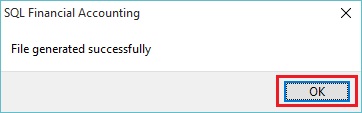
File generated successfully. Press OK to exit the below message.
Print Bad Debt Relief
GST Listing (Bad Debt Relief)
Category Others will appeared in GST Listing if there is found bad debt relief (eg. AJS-BD, AJP-BD):
| Category | Description | Local Amount | Local Tax Amount |
|---|---|---|---|
| AJS-BD | Output Tax adjustment e.g: Bad Debt Recover, outstanding invoice > 6 months | 17,000.00 | 1,020.00 |
| AJP-BD | Input Tax adjustment e.g: Bad Debt Relief | 9,114.57 | 546.87 |
GST - 03 (Bad Debt Relief)
-
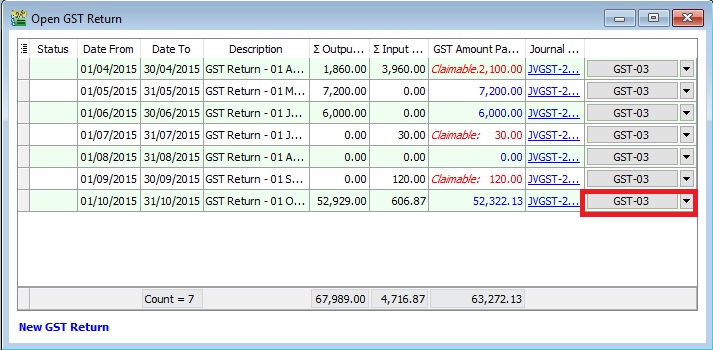
At GST Return screen, you can direct preview the GST-03 by click on the GST-03 button (see the screenshot below).
-
GST-03 result from the above sample data:
GST-03 # Description Amount 5a Total Value of Standard Rated Supply 0.00 5b Total Output Tax (Inclusive of Tax Value on Bad Debt Recovered & other Adjustments) 1,020.00 6a Total Value of Standard Rate and Flat Rate Acquisitions 0.00 6b Total Input Tax (Inclusive of Tax Value on Bad Debt Relief & other Adjustments) 546.87 17 Total Value of Bad Debt Relief Inclusive Tax 9,661.44 18 Total Value of Bad Debt Relief Recovered Inclusive Tax 0.00
Print GST Bad Debt Relief Report
-
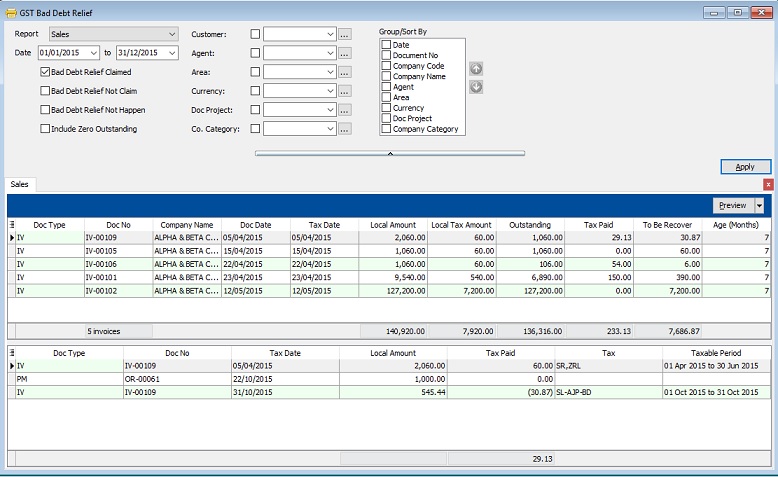
This report is to help you to analyze the GST Bad Debt Relief happenings on each invoices.
-
Let's say the IV-00109 has the following details:-
Seq Description Amount Tax Tax Amount Amount with Tax 1 Sales of coconut can drinks 1,000.00 SR 60.00 1,060.00 2 Sales of coconut 1,000.00 ZRL 0.00 1,000.00 -
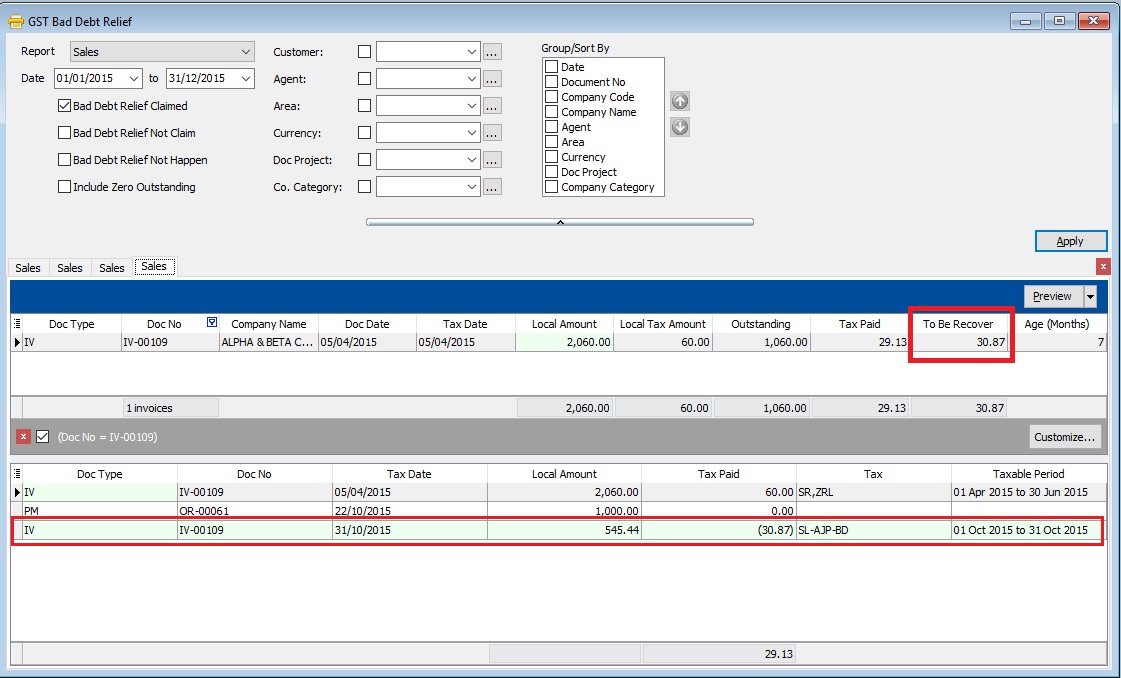
From the below report, it tells you that the bad debt relief claimed and to be recover at Rm30.87 for IV-00109. You can found at the detail that the bad debt relief claimed at Taxable Period 01 Oct 2015 to 31 Oct 2015.
-
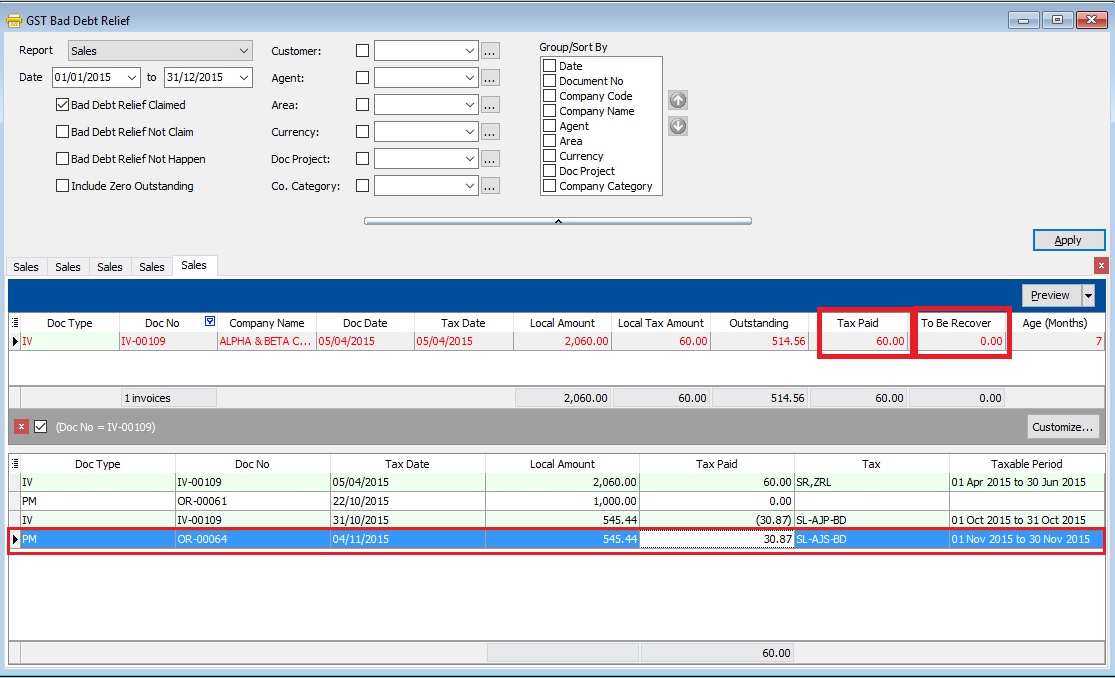
After the IV-00109 has been full settlement in month Nov 2015, you will found the full tax paid Rm60.00 and to be recover will be shown as 0. You can found at the detail that the bad debt relief recovered at Taxable Period 01 Nov 2015 to 30 Nov 2015.
-
There are some option can choose to apply the GST Bad Debt Relief for further checking:
Sales
Checkbox Explanation Bad Debt Relief Claimed GST bad debt relief that you HAVE TICKED to claim on outstanding invoices when process your GST returns. Bad Debt Relief Not Claim GST bad debt relief that you DO NOT TICKED to claim on outstanding invoices when process your GST returns. Bad Debt Relief Not Happen Outstanding invoices the GST Amount not expired at 6 months GST bad debt relief. Include Zero Outstanding To include the outstanding invoices are zero. Purchase
Checkbox Explanation Bad Debt Relief Paid GST bad debt relief have paid on the outstanding supplier invoices when process your GST returns. Bad Debt Relief Not Pay GST bad debt relief not pay yet on the outstanding supplier invoices. It could be due to late receive the supplier invoice. Bad Debt Relief Not Happen Outstanding invoices the GST Amount not expired at 6 months GST bad debt relief. Include Zero Outstanding To include the outstanding invoices are zero. -
Click Preview button. You can found the following report list.
# Report Name Usage 1 GST Bad Debt Relief - Sales GST Bad Debt Relief Listing with detail based on the checkbox ticked. 2 GST-BM Bad Debt Relief-Unclaimed Letter 1 Bahasa Malaysia bad debt relief unclaimed letter format 1 to Director General 3 GST-BM Bad Debt Relief-Unclaimed Letter 2 Bahasa Malaysia bad debt relief unclaimed letter format 2 to Director General 4 GST-EN Bad Debt Relief-Unclaimed Letter 1 English version bad debt relief unclaimed letter format 1 to Director General 5 GST-EN Bad Debt Relief-Unclaimed Letter 2 English version bad debt relief unclaimed letter format 2 to Director General TIPS 1 : To print the bad debt relief unclaimed letter.-
Select the Date Parameter as the GST effective date onwards.
-
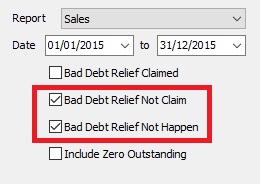
Tick both Bad Debt Relief Not Claim and Bad Debt Relief Not Happen to apply follow by preview.
-
This letter applicable to customer has maintained GST No in Maintain Customer only.
-
Margin Scheme
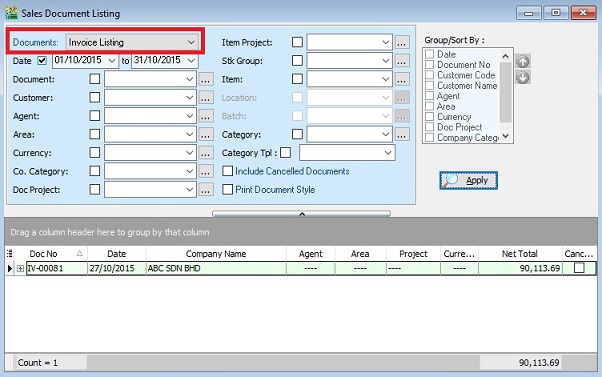
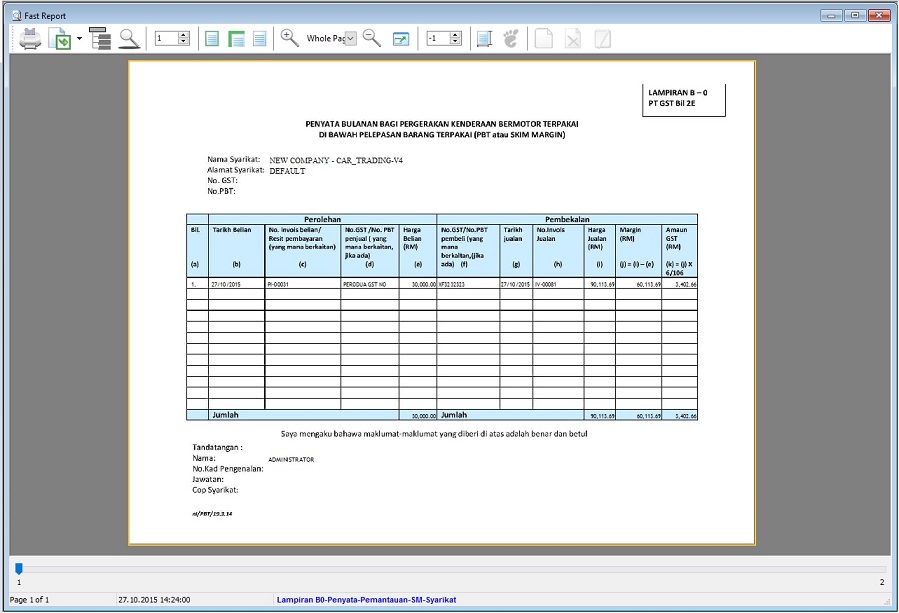
Print for Lampiran 07 (Lampiran B0-Penyata-Pemantauan-SM-Syarikat)
-
Select document to “Invoice Listing” and click APPLY.
-
Click on preview or print. Select the report name “Lampiran B0-Penyata-Pemantauan-SM-Syarikat”.
GST Treatment - Partial Exemption
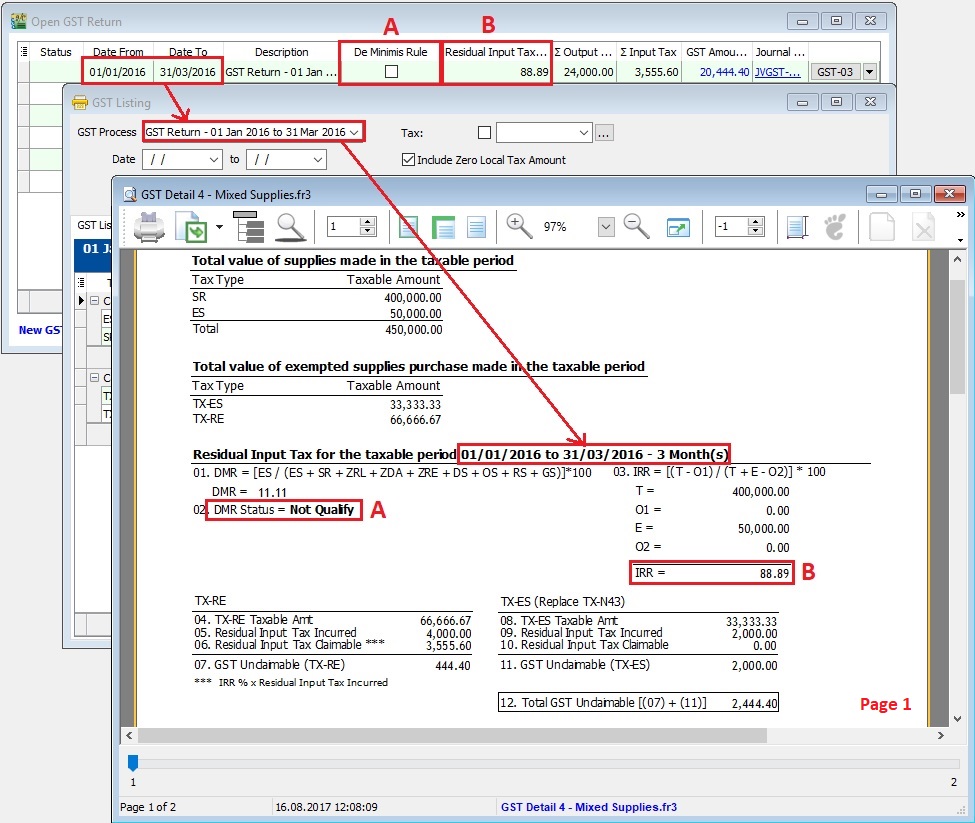
GST Listing - Mixed Supply
Monthly/Quarterly
- Select the GST Process.
- Click Apply.
- Click Preview.
- Select the report name : GST Detail 4 - Mixed Supplies.
- Press Ok.
Page 1: GST Listing 4 - Mixed Supplies
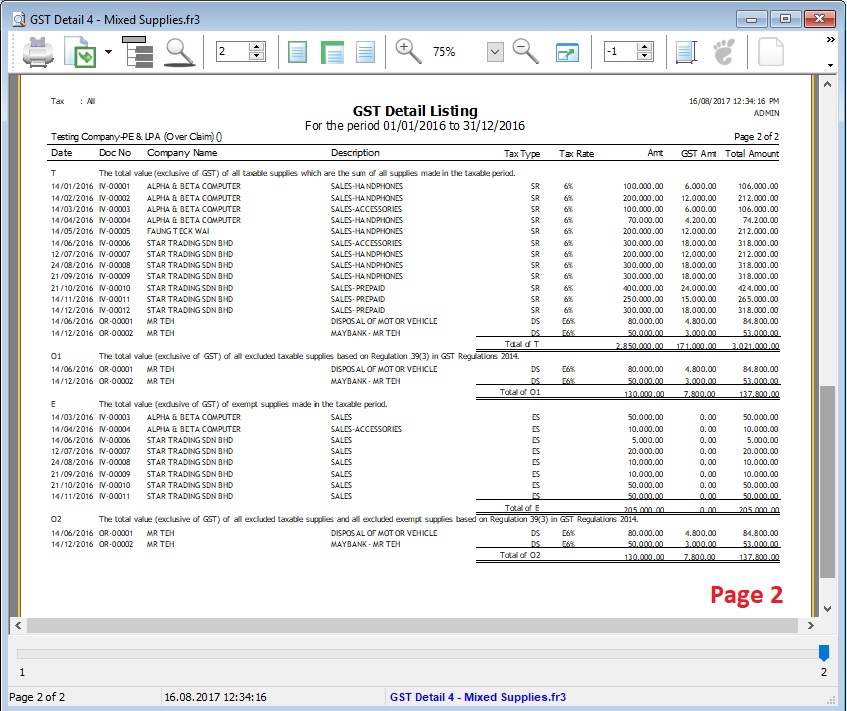
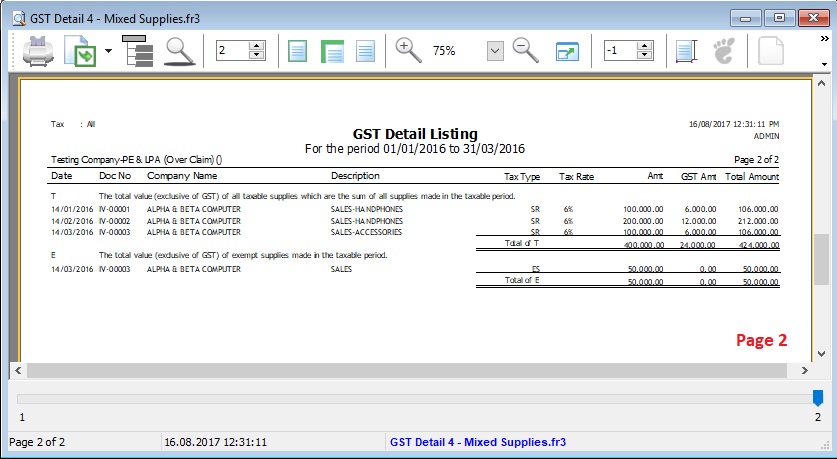
Page 2: GST Listing 4 - Mixed Supplies
Longer Period Adjustment (LPA)
GST Listing - Mixed Supplies
Longer Period Adjustment (LPA)
- Select the Date From and Date To (eg. the financial year is 01/01/2016 - 31/12/2016).
- Click Apply.
- Click Preview.
- Select the report name : GST Detail 4 - Mixed Supplies.
- Press Ok.
Page 1 : GST Listing 4 - Mixed Supplies
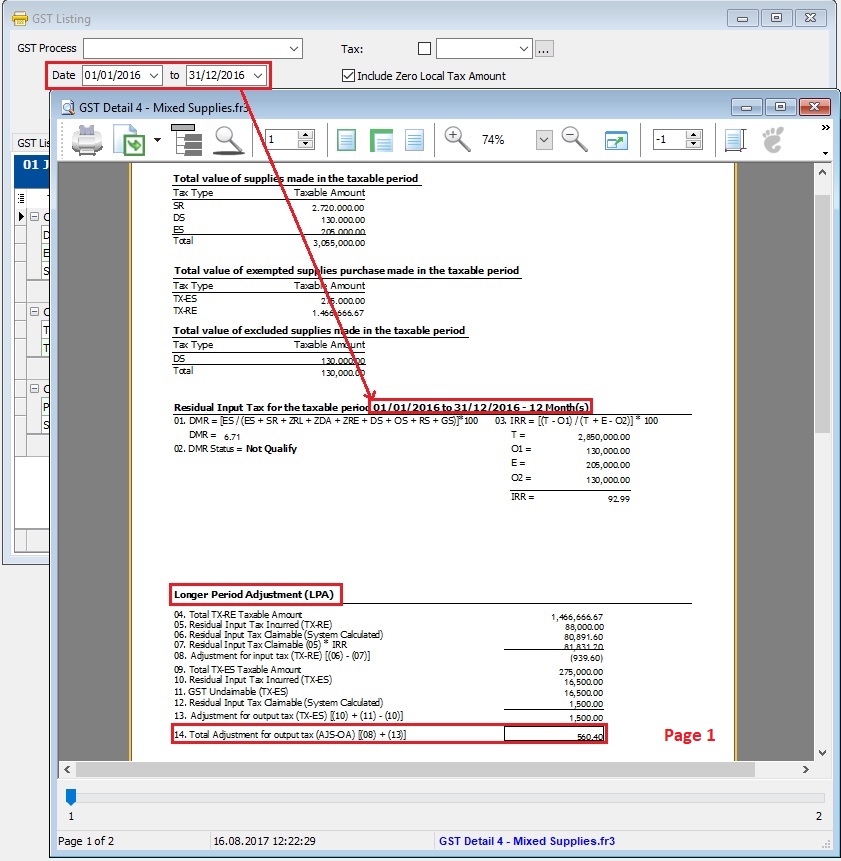
Page 2: GST Listing 4 - Mixed Supplies