Acc Cash Register Import Guide
Supported Model
Sharp
Format 1
- XE-A147
- XE-A137
Format 2
- XE-A207
- XE-A217
- XE-A307
- ER-A411/ER-A421
Import Program
- Version (1.1.0.1) - 19 Oct 2016
- Evaluation Limit : 5 Times Posting
- SQL Acc Cash Register setup
- MD5 : BF105B609B19CE6CA9E0186F4CD78B7F
Setting
Cash Register Machine
- Below is the setting to be set in your Cash Register Machine
- Updated 19 Mar 2016
- All setting can be done at PGM mode → Setting → function text
- For Currency can be done at PGM mode → Setting → Optional → Basic system
| Description | Function | Text |
|---|---|---|
| Currency Symbol | CURRENCY TEXT | RM |
| GST Standard Rate Symbol | TXBL1 SYMBOL | S |
| GST Zero Rate Symbol | TXBL2 SYMBOL | Z |
| Taxable subtotal (SubTotalWithTax) | TAX1 ST | GST TAX AMT |
| Taxable subtotal (SubTotalWithTax) | TAX2 ST | ZERO TAX AMT |
| VAT (GSTAmt) | VAT 1 | GST 6% |
| VAT (GSTAmt) | VAT 2 | GST 0% |
| Rounding | DIFFER | ROUNDING |
| DocAmt | Total | ***TOTAL |
| Total Before Service Charge | Subtotal | SUBTOTAL |
| Service Charge | SER.CHRG | SER.CHRG |
| Total After Service Charge before GST | NET 1 | NET |
| Cash Payment | CASH | CASH |
| Cheque Payment | CHECK | CHECK |
| Credit Card Payment | CREDIT | CREDIT |
- All amount should be in Tax Inclusive as this is GST Rule for Simplified Tax Invoice
- You are not allow to VOID the Invoice
SQL Accounting May refer to Point 1 at Things To Consider Before Import/Post
Cash Register Import Menu: Tools | Options...
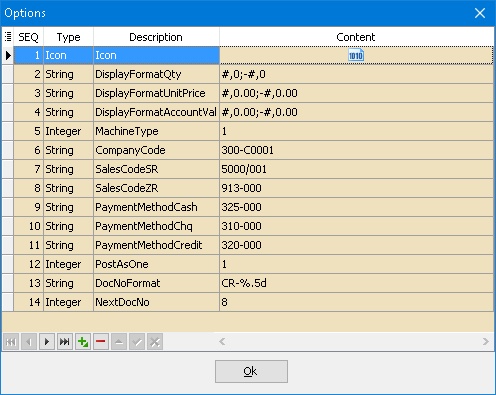
| Function | Description |
|---|---|
| DisplayFormatQty | Display Format For Quantity Field |
| DisplayFormatUnitPrice | Display Format For Unit Price Field |
| DisplayFormatAccountValue | Display Format For Amount Field |
| *MachineType | Last used Machine Type |
| *CompanyCode | Last used Customer Code |
| *SalesCodeSR | Last used Sales Code for SR |
| *SalesCodeZR | Last used Sales Code for ZR |
| *PaymentMethodCash | Last used Cash Payment Method Code |
| *PaymentMethodChq | Last used Cheque Payment Method Code |
| *PaymentMethodCredit | Last used Credit Card Payment Method Code |
| *PostAsOne | Posting Type |
| DocNoFormat | Document Number Format for PostAsOne = 1 |
| NextDocNo | Next Document Number for PostAsOne = 1 |
- User may ignore the option with * as this can be set on Posting Screen
- For Service Charge & Rounding system will use SalesCodeSR
Step
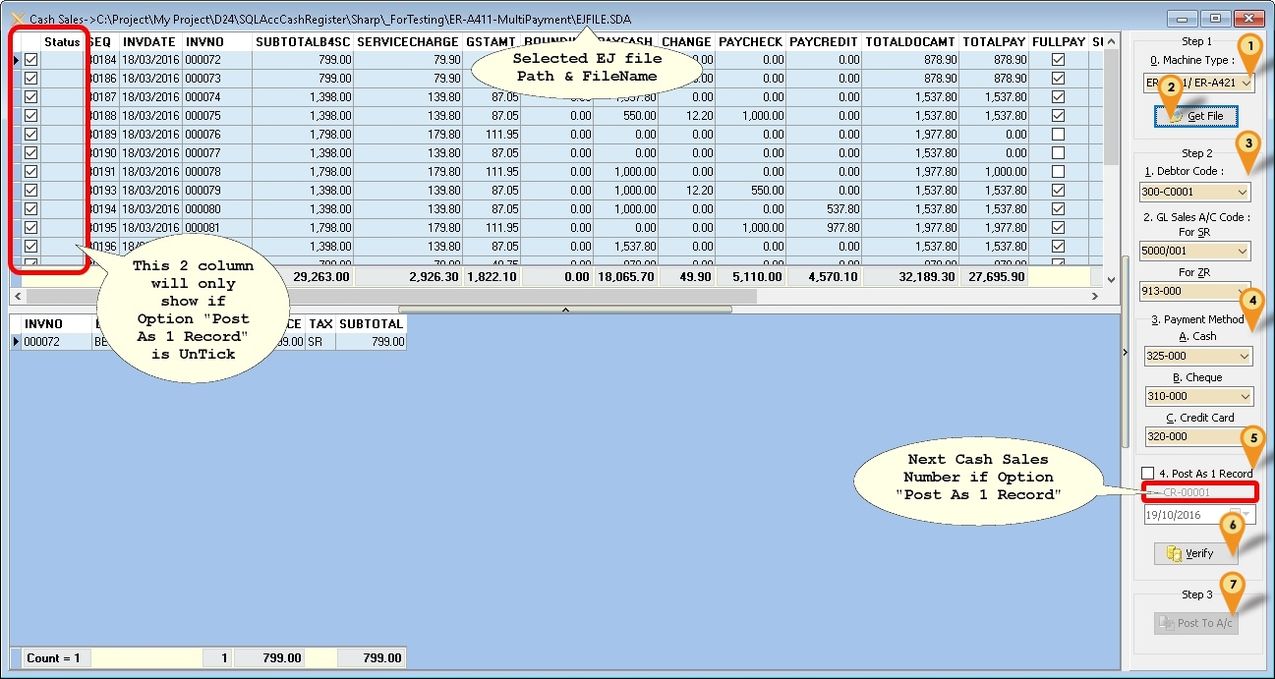
Menu: Cash Sales...
-
Select Machine Type
-
Click Get File & browse to the folder & look for EJFILE.SDA
-
Steps 2 Select Debtor Code for Debtor Field Select Sales Account Code for SR Select Sales Account Code for ZR
-
Payment Method Select Payment Method Account Code For Cash Select Payment Method Account Code For Cheque Select Payment Method Account Code For Credit Card
-
Tick Post As 1 Record if you wanted to post all transaction as 1 Cash Sales (Recommended)
Option Description True (Tick) System will Post to SQL Accounting As 1 Cash Sales (Recommended) False (UnTick) System will Post 1 by 1 InvNo to Cash Sales Select the Date (applicable if Post As 1 Record is Selected)
-
Click Verify to check any Duplicate Cash Sales Number
-
Click Post To A/c button to Post.
FAQ
How do I know which EJ File had posted?
In Build 1 & above once the EJ had posted to SQL Acc it will automatic rename the EJ file to EJFILE-yyyy-mm-dd.sda (yyy-mm-dd is the date posted)