Third Party Import
Mamee
Is External Shareware Program which to import Mamee Text or CSV file to
- Sales Invoice
- Sales Credit Note
- Sales Debit Note (Non Product Related Only)
Limitation (Mamee)
- Fixed Tax Code SR (i.e. all transaction is SR)
- Only support Mamee Product Related file (i.e. file with end HDR or DTL eg INVHDR or INVDTL)
Mamee Specification
Format 1 (Mamee)
- 03 Dec 2015
- Mamee Example File
Format 2 (Mamee)
- 22 Nov 2017
- Mamee Example File 2
Import Program (Mamee)
- Version (2.4.0.5) - 08 Dec 2017
- Evaluation Limit : 100 Records per file
- SQL Account Mamee Import Setup
- MD5 :
BA72428486784AFC3655601294BE83FD
History New/Update/Changes (Mamee)
--Build 5--
-
Upgrade to Version 2.4.
-
Upgrade to New Compiler.
-
Add Format 2 import. --Build 4--
-
Upgrade to Version 1.3.
-
Add Maintain Non-Product GL Function.
-
Enable Import Non-Product Sales CN & DN Import --Build 3--
-
Upgrade to Version 1.2.
-
Error in matching Agent
-
Amount not excluding Disc Amount after Import.
-
Add Link to SQL Acc. File | Run.
-
Rearrange Detail column
-
Fix Detail not Sort by Seq
-
Set Disc to 2 Decimal Point. --Build 2--
-
Error on Maintain Agent if Record More then 1 --Build 1--
-
Upgrade to Version 1.1
-
Add Maintain Agent Function.
-
Enable Use Census Number field as SQL Acc Customer Code.
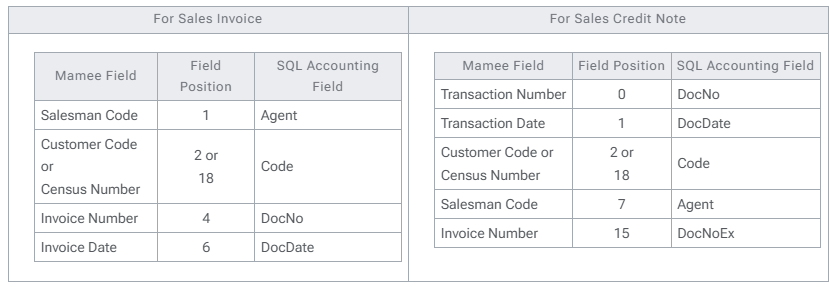
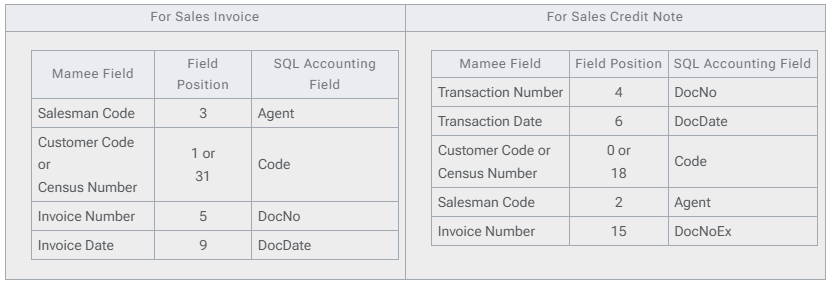
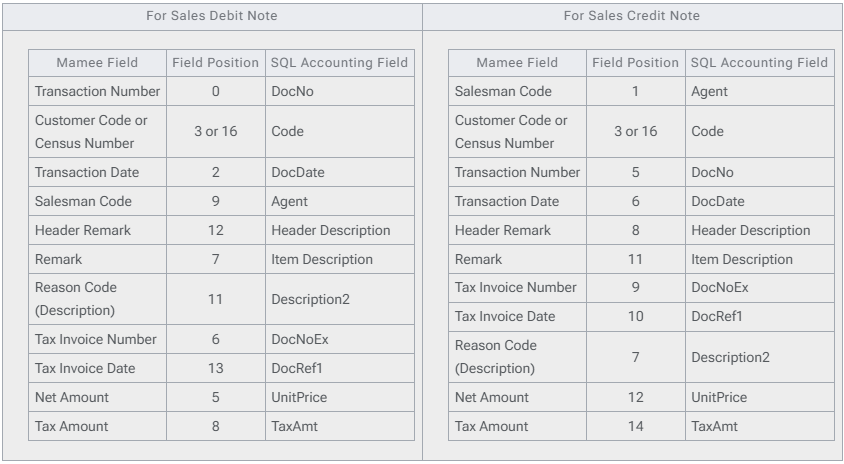
Field Mapping - Header (Mamee)
Produc Related - Format 1 (Mamee Header)
Product Related - Format 2 (Mamee Header)
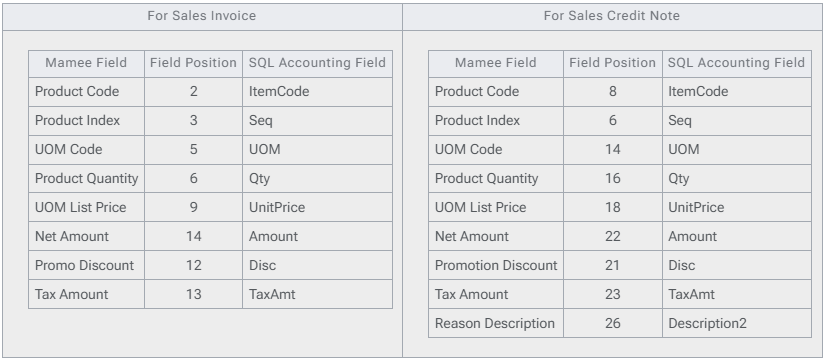
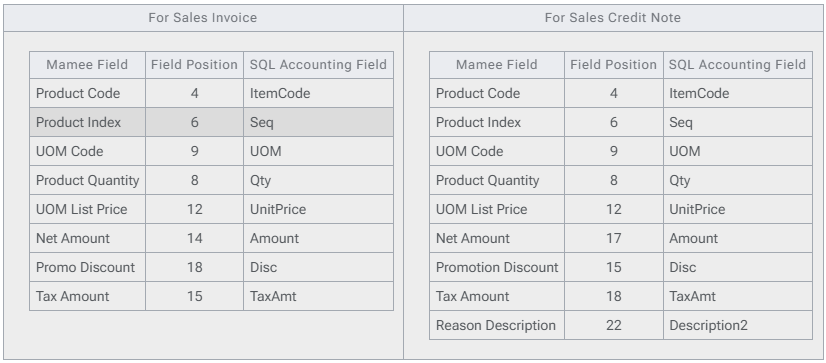
Field Mapping - Detail (Mamee)
Product Related - Format 1 (Mamee Detail)
Product Related - Format 2 (Mamee Detail)
Non-Product Related (Mamee Header)
Setting (Mamee)
In SQL Accounting (Mamee)
Make sure this option is Tick under Tools | Options | Customer
- One Cent Different Rounding (Local Currency Fields) for all AR/SL Documents (Recommended)
In Mamee Import
Menu : Tools | Options...
| Options | Description |
|---|---|
| MameeCustomerCodeAsCode | 0 : Mamee Census Number check against SQLAcc Customer Code Field1 : Mamee Customer Code same as SQLAcc Customer Code Field (Recommended) |
| MameeSalesmanCodeAsAgent | 0 : Mamee Salesman Code will use Mamee Import Agent List1 : Mamee Salesman Code same as SQLAcc Agent Code (Recommended) |
| FormatType | 1 : Format 12 : Format 2 |
Menu : Tools | Maintain Agent...
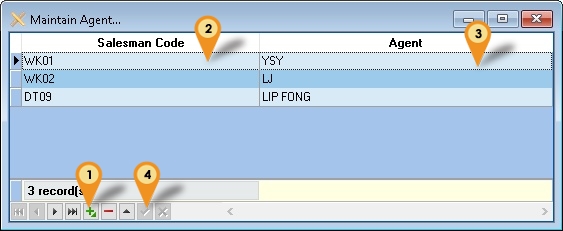
| Options | Description |
|---|---|
| Saleman Code | Mamee Salesman Code |
| Agent | SQL Accounting Agent Code |
- Click the + button
- Enter the Mamee Salesman Code
- Select the SQL Accounting Agent Code
- Click Tick to Save Menu : Tools | Maintain Non-Product GL...
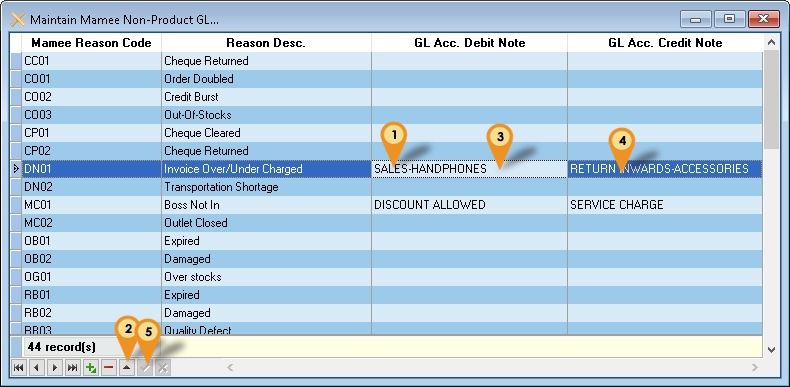
| Options | Description |
|---|---|
| Mamee Reason Code | Mamee Reason Code |
| Reason Desc. | Mamee Reason Description |
| GL Acc. Debit Note | SQL Accounting GL Account Code for Debit Note |
| GL Acc. Credit Note | SQL Accounting GL Account Code for Credit Note |
- Select the record
- Click Edit (the up arrow)
- Select the GL Code for Debit Note
- Select the GL Code for Credit Note
- Click Tick to Save
Steps (Mamee)
Product Related (Mamee)
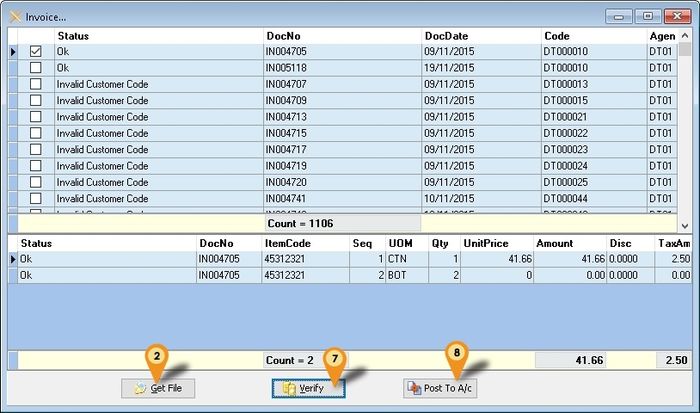
Below steps is example to import Sales Invoice
-
Click Product | Invoice...
-
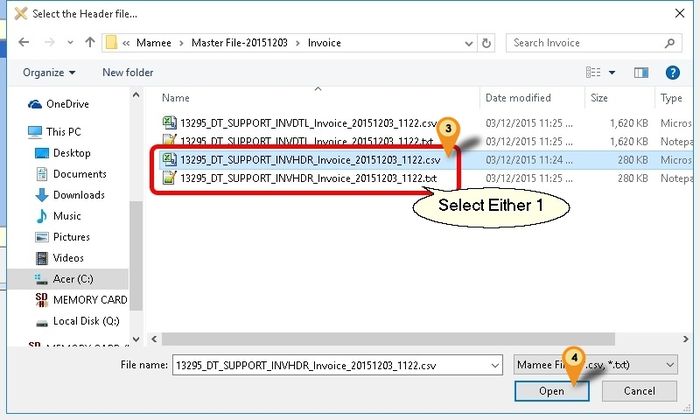
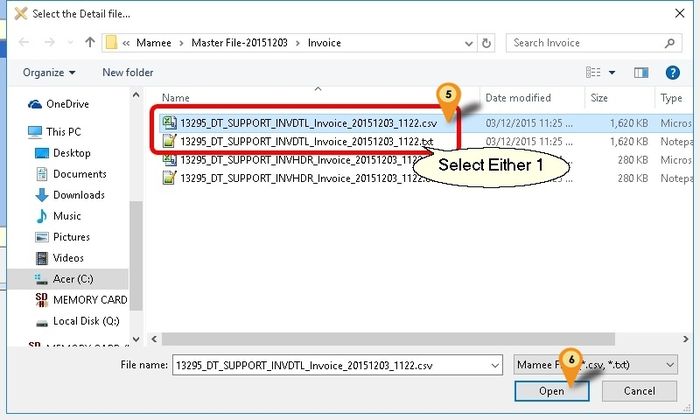
Click Get File button & system will prompt 2 dialog like below
-
Select the Mamee Invoice Text/CSV Header File
-
Click Open
-
Select the Mamee Invoice Text/CSV Detail File
-
Click Open
-
Click Verify button to check the data with SQL Accounting Data
-
Click Post To A/c button if confirm all is ok to post to SQL Accounting
Record(s) will only Post if the Check Box is Tick & Status is Ok
Non-Product Related (Mamee)
Below steps is example to import Sales Credit Note
-
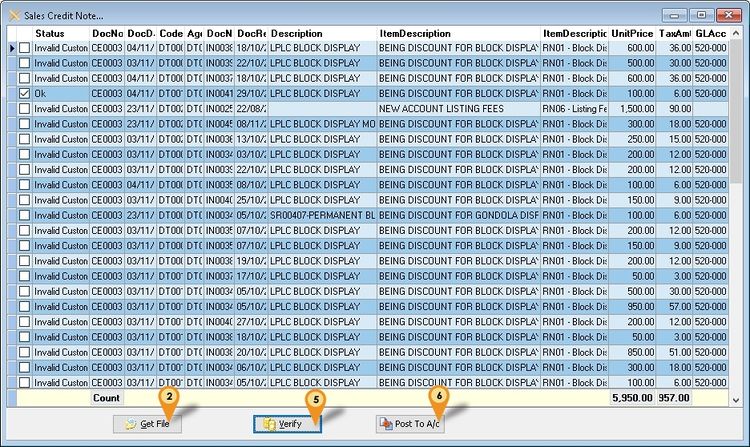
Click Non-Product | Credit Note...
-
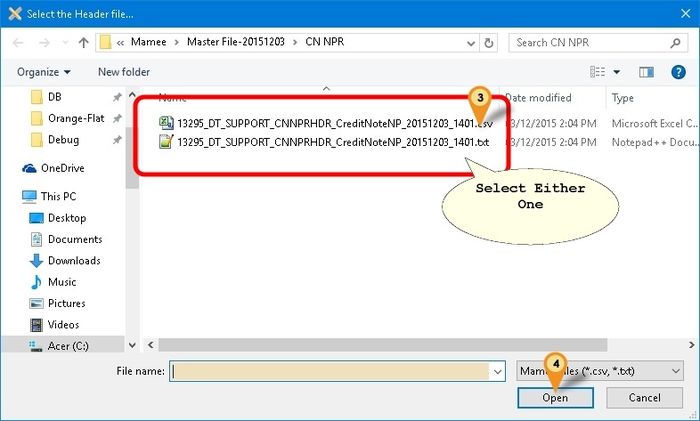
Click Get File button & system will prompt dialog like below
-
Select the Mamee Non Product Credit Note Text/CSV File
-
Click Open
-
Click Verify button to check the data with SQL Accounting Data
-
Click Post To A/c button if confirm all is ok to post to SQL Accounting
F&N
Is External Shareware Program which to import F&N Text file to
-
Sales Invoice
-
Sales Credit Note Export E-Invoice to F&N - Available in Build 18 & Above
-
Sales Invoice
-
Sales Credit Note
Limitation (F&N)
- TaxCode with DS will not import.
F&N Specification
-
17 Jun 2015 - ESD soft-drink
-
15 Aug 2016 - ESD Online
Import Program (F&N)
- Version (3.5.0.23) - 18 Dec 2024
- Evaluation Limit : 50 Records per file
- SQL Account F&N Import Setup
- MD5 :
F8114AE694FB966D93082A3FEC57D17C
History New/Update/Changes (F&N)
--Build 23--
-
Remove Check UOM from Option.
-
Add check UOM base on FnN UOM. --Build 22--
-
Fix partly support Version 860 & above.
-
Add show Outlet Name. --Build 21--
-
Enable support Version 858 for Export E-IV.
-
Enable support Version 860 & above. --Build 20--
-
Fixed Export E-IV for CN apply error.
-
Fixed Export E-IV dateTimeValidated formatting not correct. --Build 19--
-
Enable Import E-Invoice Info from FnN.
-
Fixed Export E-IV header delimiter not correct. --Build 18--
-
Upgrade to Version 3.6.
-
Add FnN to Header Field CC as indicator Import from FnN.
-
Remove L tax code from import.
-
Set Default Open FnN ESD Online Files format.
-
Add E-Invoicing Export function. --Build 17--
-
Fixed Use UOMList not working. --Build 16--
-
Add Import Remark to DeliveryTerm Field for CSV format. --Build 15--
-
Add Auto Set to Outlet_ID2 if Debtor_Code2 is empty for CSV format.
-
Add Get User Guide Option. --Build 14--
-
Upgrade to Version 3.5.
-
Enable support Running In Windows Limited User.
-
Fixed Verify Detail Error not untick the Master when itemcode not found.
-
Fixed Verify Not Check Item Code UOM.
-
Fixed Scrollbar not visible. --Build 13--
-
Upgrade to Version 3.4.
-
Add Project & Location Lookup for Posting. --Build 12--
-
Add Outlet_ID2 to shown in Grid. --Build 11--
-
Upgrade to D25 Compiler.
-
Upgrade to Version 3.3.
-
Remove Import Debtor_Name2. --Build 10--
-
Upgrade to XE10 Compiler.
-
Upgrade to Version 3.2
-
Add Link to SQL Acc. File | Run.
-
Add OutletID=Maintain Customer Code
-
Add ESD Online - CSV Format --Build 9--
-
Fix unable to import docamt is 0 even is no DS Code.
-
Fix Status no dropdown list.
-
Fix Detail not Verify. --Build 8--
-
Fix Get File Error when record is without tax code. --Build 7--
-
Fix CN Get File Error.
Field Mapping - Header (F&N)
- As at 17 Jun 2015 - ESD soft-drink - Fixed Length Format
| FnN Field | Field Position | Field Size | SQL Accounting Field |
|---|---|---|---|
| Invoice_Date | 1 | 10 | DocDate |
| Invoice_ID | 11 | 10 | DocNo |
| Gross Amount | 41 | 10 | DocAmt |
| Outlet_ID | 71 | 10 | Maintain Customer Remark or Code |
- As at 15 Aug 2016 - ESD Online - CSV Format
| FnN Field | Field Position | Field Size | SQL Accounting Field |
|---|---|---|---|
| Invoice_Date | 0 | 10 | DocDate |
| Invoice_ID | 1 | 15 | DocNo |
| Total_Gross_Amount | 4 | 10 | DocAmt |
| Debtor_Code2 | 9 | 10 | Customer Code |
| Debtor_Name2 | 10 | 150 | Customer Name Not valid for Build 11 & above |
| Outlet_ID2 | 11 | 10 | Display Only |
| Remark | 12 | 200 | Delivery Term Available in Build 16 & above |
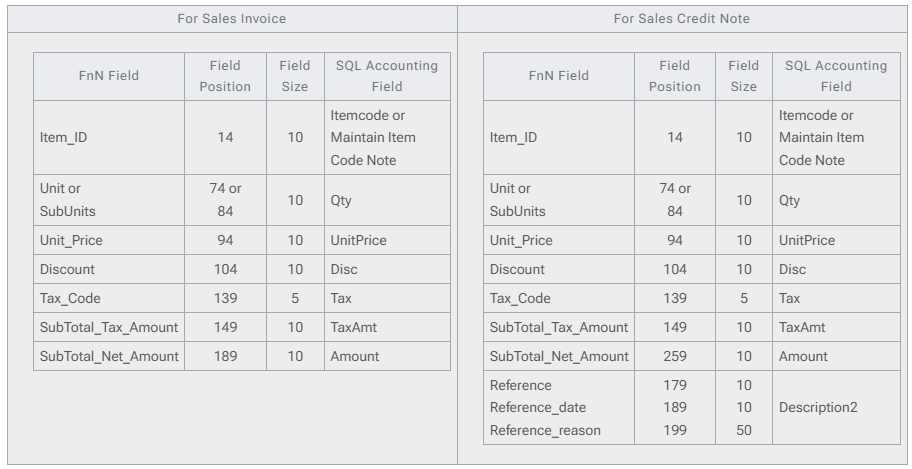
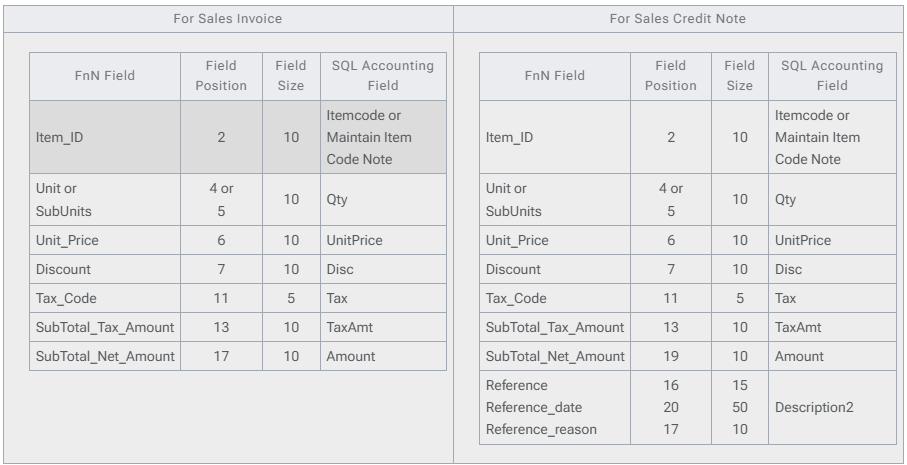
Field Mapping - Detail
- As at 17 Jun 2015 - ESD soft-drink - Fixed Length Format
- As at 15 Aug 2016 - ESD Online - CSV Format
Setting (F&N)
In SQL Accounting (F&N)
- May refer to Point 2 at Things To Consider Before Import/Post
- Make sure this option is Tick under Tools | Options | Customer
- Perform Tax/Local Amount Rounding
In F&N Import
| Options | Description |
|---|---|
| UOMList | List of UOM available in F&N (Normally is CTN & PCS) |
| DocNoAsDocNo | 0 : F&N DocNo will post to SQLAcc DocNoEx Field 1 : F&N DocNo will post to SQLAcc DocNo Field (Recommended) |
| FNCodeAsItemCode | 0 : F&N ItemCode will check against SQL Accounting | Maintain Item | Note Field 1 : F&N Itemcode same as SQL Accounting Itemcode (Recommended) |
| FNUOMAsUOM | 0 : F&N ItemCode will check against UOMList 1 : F&N Itemcode UOM same as SQLAcc Itemcode UOM (Recommended) |
| OutletIDAsCompCode | For ESD soft-drink – Fixed Length Format Only 0 : F&N Outlet ID will check against SQL Accounting | Maintain Customer | Remark Field 1 : F&N Outlet ID same as SQLAcc Customer Code (Recommended) |
Steps (F&N)
Import Invoice/Credit Note (F&N)
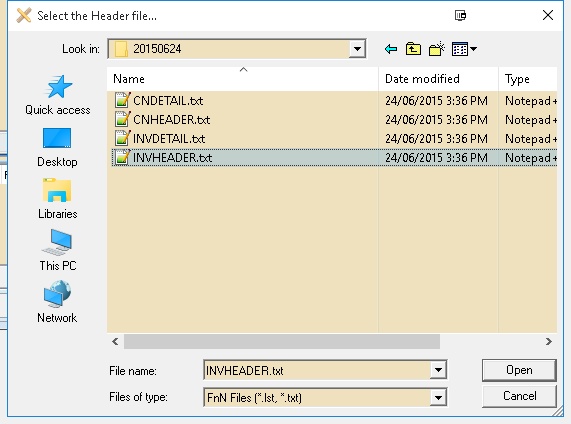
Below steps is example to import Sales Invoice 01. Click Sales | Invoice... 02. Click Get File button & system will prompt 2 dialog like below
-
Click Files of Type & select the FnN File Format type
-
Select the F&N Invoice Text Header File

-
Select the F&N Invoice Text Detail File
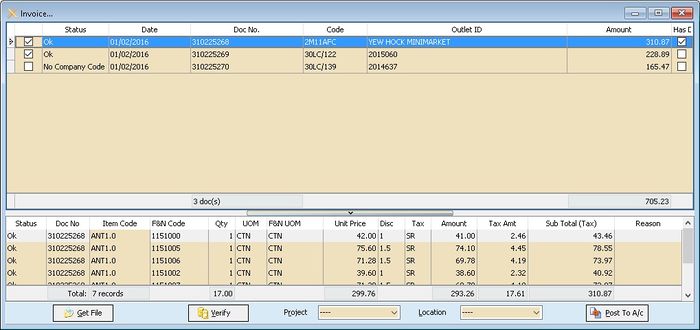
-
Click Verify button to check the data with SQL Accounting Data
-
Select Project & Location (if Required)
-
Click Post To A/c button if confirm all is ok to post to SQL Accounting
Remember to check the data with Has Deemed Supplies column which is Tick as system will by pass posting
Export E Invoice/Credit Note (F&N)
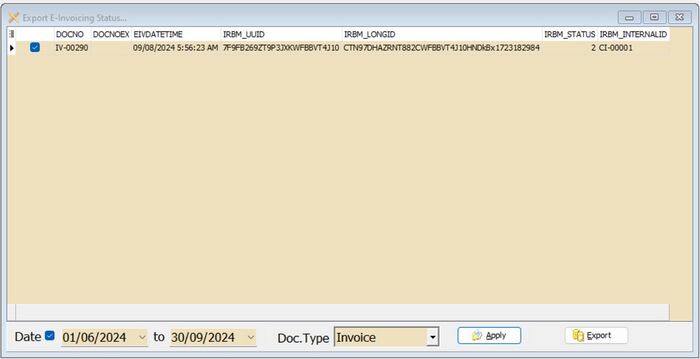
- Click Export E-Invoice Status...
- Select Range Date (E-Invoice Submission date)
- Select DocType (eg Invoice)
- Click Apply
- Click Export
Unilever
Is External Shareware Program which to import Unilever CSV file to
- Sales Order
- Sales Invoice
- Sales Credit Note
Unilever Specification
- 07 Feb 2018
- Unilever Import Structure-20180207
- 25 Sep 2017
- Unilever Import Structure-20170925
Import Program (Unilever)
- Version (1.3.0.12) - 05 Apr 2025
- Evaluation Limit : 100 Records per file
- SQLAccUnileverImp-setup.exe
- MD5 :
44F7A21D88D3EA4F4C1D7CF0571FFD5D
History New/Update/Changes (Unilever)
--Build 12--
-
Fixed Get SO for Old Format no data. --Build 11--
-
Upgrade to Version 1.3.
-
Add Option to Import as Sales Order.
-
Add Get User Guide option. --Build 10--
-
Enable Support Version 860 & above. --Build 9--
-
Add Copy Cell Value Function.
-
Add Auto Add Rounding for DocAmt <> Total Detail Amount. --Build 8--
-
Fixed Find Company Code not Correct if almost same Retail Code.
-
Fixed Setting loss after uninstall. --Build 7--
-
Upgrade to Version 1.2.
-
Enable Support if Unilever using Both Cases and Pieces for 1 row by Convert to Smallest UOM for Cases. --Build 6--
-
Add ZRL & SR TaxCode Option --Build 5--
-
Fix Header DocNo not match with Detail DocNo --Build 4--
-
Verify DocNo not correct for Old Format import
-
Amount should deduct Discount before append --Build 3--
-
Upgrade to Version 1.1.
-
Add back Old Format Import with auto add 00 in-front of DocNo before Post to Account. --Build 2--
-
Fixed UnitPrice 0 when After Post to Account. --Build 1--
-
Update New Format. --Build 0--
Field Mapping - Header (Unilever)
- 25 Sep 2017
| Unilever Field | Field Position | Field Size | SQL Accounting Field |
|---|---|---|---|
| INVH_Type | 1 | 2 | 01 – Sales Invoice 02 – Sales Credit Note |
| INVH_No | 3 | 10 | DocNo |
| INVH_Retailer | 17 | 8 | Code or Maintain Customer Remark |
| INVH_Date | 26 | 19 | DocDate |
| INVH_Total | 141 | 21 | Amount Before Discount |
| INVH_Discount | 162 | 21 | Discount Amount |
- 07 Feb 2018
| Unilever Field | Field Position | Field Size | SQL Accounting Field |
|---|---|---|---|
| INVH_Type | 1 | 2 | 01 – Sales Invoice 02 – Sales Credit Note |
| INVH_No | 3 | 12 | DocNo |
| INVH_Retailer | 19 | 8 | Code or Maintain Customer Remark |
| INVH_Date | 28 | 19 | DocDate |
| INVH_Total | 143 | 21 | Amount Before Discount |
| INVH_Discount | 164 | 21 | Discount Amount |
Field Mapping - Detail (Unilever)
- 25 Sep 2017
| Unilever Field | Field Position | Field Size | SQL Accounting Field |
|---|---|---|---|
| INVR_No | 3 | 10 | DocNo |
| INVR_Product | 13 | 8 | Item Code or Maintain Item Code Note |
| INVR_Cases | 26 | 22 | Qty (UOM = CA) |
| INVR_Pieces | 48 | 22 | Qty (UOM = PCS) |
| INVR_Amount | 70 | 21 | Amount |
| INVR_Discount | 91 | 21 | Discount |
| INVR_TAXRate | 133 | 22 | 0 Tax Code = ZRL 6 Tax Code = SR |
| INVR_TAXTotal | 155 | 21 | GST Amount |
- 07 Feb 2018
| Unilever Field | Field Position | Field Size | SQL Accounting Field |
|---|---|---|---|
| INVR_No | 3 | 12 | DocNo |
| INVR_Product | 15 | 8 | Item Code or Maintain Item Code Note |
| INVR_Cases | 28 | 22 | Qty (UOM = CA) |
| INVR_Pieces | 50 | 22 | Qty (UOM = PCS) |
| INVR_Amount | 72 | 21 | Amount |
| INVR_Discount | 93 | 21 | Discount |
| INVR_TAXRate | 135 | 22 | 0 Tax Code = ZRL 6 Tax Code = SR |
| INVR_TAXTotal | 157 | 21 | GST Amount |
- Unit Price will not import & will auto Assign by SQL Accounting due to Unilever file don't had Pieces Price & UOM Rate
Setting (Unilever)
In SQL Accounting (Unilever)
-
May refer to Point 2 at Things To Consider Before Import/Post
-
Make sure this option is Tick under Tools | Options | Customer
- Perform Tax/Local Amount Rounding
-
Menu: Stock | Maintain Stock Item...
- Item Code to be create
- Rounding
In Unilever Import (Unilever)
This can be see under Tools | Options
| Options | Description |
|---|---|
| UOM_Cases | UOM for Cases in SQL Accounting Default is CA |
| UOM_Pieces | UOM for Pieces in SQL Accounting Default is PCS |
| RetailAsCompCode | 0 : Unilever Retail Code will check against SQL Accounting | Maintain Customer | Remark Field 1 : Unilever Retail Code same as SQL Accounting Customer Code (Recommended) |
| UnileverCodeAsItemCode | 0 : Unilever Item Code will check against SQL Accounting | Maintain Item | Note Field 1 : Unilever Item Code same as SQL Accounting Item Code (Recommended) |
| TaxCodeZRL | Tax code for 0% |
| TaxCodeSR | Tax Code other than 0% |
Steps (Unilever)
Below steps is example to import Sales Invoice
-
Click Sales | Invoice...
-
Click Get File button & system will prompt 2 dialog like below
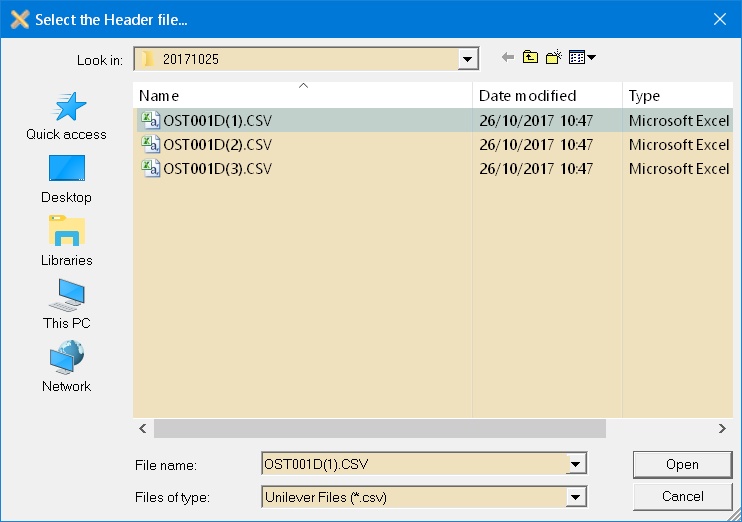
-
Select the Unilever Invoice Text Header File
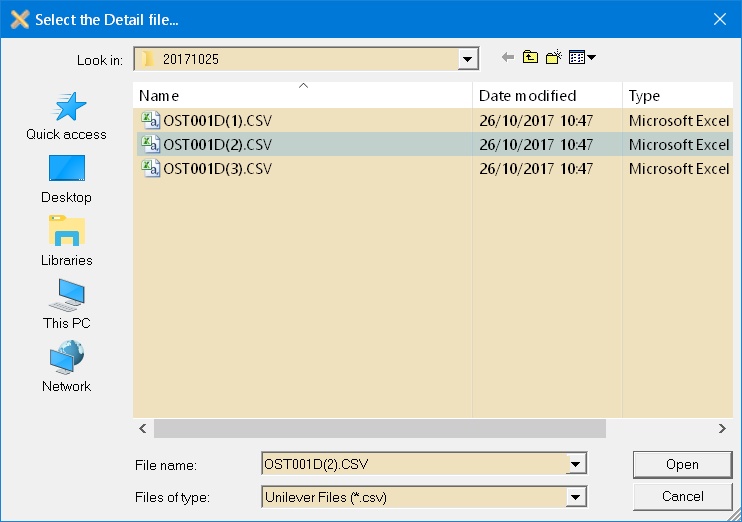
-
Select the Unilever Invoice Text Detail File
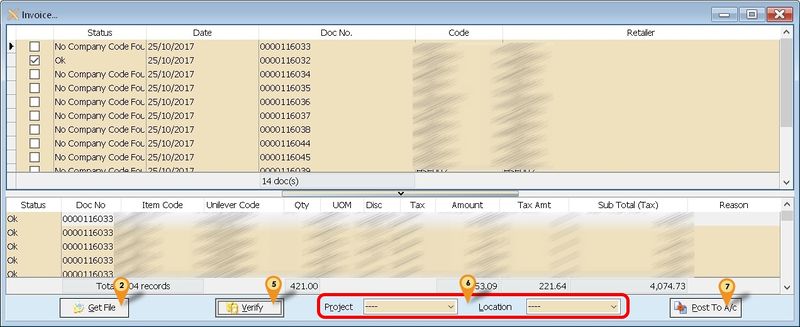
-
Click Verify button to check the data with SQL Accounting Data
-
Select Project & Location (if Required)
-
Click Post To A/c button if confirm all is ok to post to SQL Accounting
Dryper
Is External Shareware Program which to import & Export Dryper excel file to
Import
- Sales Order or Sales Invoice
- Purchase Order or Purchase Invoice Export
- Sales Credit Note
Dryper Specification
- 15 Jan 2019
- Dryper Specification-20190115
Import Program (Dryper)
- Version (1.1.0.3) - 29 Jan 2021
- Evaluation Limit : 100 Records per file
- SQLAccDryperImp-setup
- MD5 :
5D18B0207C9C12168D0394855EA378ED
History New/Update/Changes (Dryper)
--Build 3--
-
Enable Support Version 782 & above (New ROC).
-
Fixed DocNo Not able to select.
-
Fixed Unable to Batch Highlight DocNo.
-
Fixed Import Prompt Date Error.
-
Add Shortcut Get User Guide. --Build 2--
-
Add Option SL-UseDryperItemDesc & PH-UseDryperItemDesc.
-
Add Option SL-UseDocNoEx & PH-UseDocNoEx.
-
Fixed Setting will loss on Uninstall. --Build 1--
-
Upgrade to Version 1.1.
-
Add Option for use CustomerCode or ExternalReferenceNo2 for SQL Accounting Customer Code.
-
Add Check Box at DocNo & remove Check Box in Data Grid
-
Add Import PO & PI.
-
Add Checking for BizNature & CompanyName2 field for Customer/Supplier Code
-
Remove Import DocNoEx for ExternalReferenceNo2
-
Add Checking for Description2 & Note field for Item Code.
-
Fixed unable to register. --Build 0--
Field Mapping (Dryper)
Sales Order or Sales Invoice (Dryper Mapping)
| Dryper Field – SO | Dryper Field – IV | SQL Accounting Field |
|---|---|---|
| SalesOrderCode | SalesInvoiceCode | DocNo |
| Either 1 below | Either 1 below | |
| CustomerCode | CustomerCode | Code |
| ExternalReferenceNo2 | ExternalReferenceNo2 | RegisterNo / GSTNo / Remark / CompanyName2 |
| OrderDate | InvoiceDate | DocDate |
| ItemCode | ItemCode | Either 1 below |
| Code Remark1 Remark2 Shelf Barcode | ||
| ItemName | ItemName | Item Description |
| Quantity | Quantity | Qty |
| UOM | UOM | UOM |
| UnitPrice | UnitPrice | UnitPrice |
| DiscountRate where LineType = 1 | DiscountRate where LineType = 1 | Disc |
| TotalTaxAmount | TotalTaxAmount | TaxAmt |
| NetAmount | NetAmount | Amount |
| RoundingAmount | RoundingAmount | Will Append as New itemcode RTN5Cents |
Purchase Order or Purchase Invoice (Dryper Mapping)
| Dryper Field – PO | Dryper Field – PI | SQL Accounting Field |
|---|---|---|
| PurchaseOrderNo | InvoiceNo | DocNo |
| Either 1 below | Either 1 below | |
| CreditorCode | CreditorCode | Code |
| SupplierCode | SupplierCode | RegisterNo / GSTNo / Remark / CompanyName2 |
| ItemCode | ItemCode | Either 1 below |
| Code Remark1 Remark2 Shelf Barcode | ||
| ItemName | ItemName | Item Description |
| POQuantity | Quantity | Qty |
| UOM | UOM | UOM |
| UnitCost | UnitPrice | UnitPrice |
| NetAmount | NetAmount | Amount |
| OrderDate | GRNDate | DocDate |
Customer Credit Note - Export (Dryper Mapping)
| Dryper Field | SQL Accounting Field |
|---|---|
| CompanyCode | Hard Coded as 1 |
| DistributorCode | Field To Enter in Export Program |
| BranchCode | Field To Enter in Export Program |
| CustomerCode | Customer Code |
| DocumentNo | DocNo |
| DocumentDate | DocDate |
| TotalAmount | DocAmt |
| PaidAmount | DocAmt |
| Status | Hard Coded as 1 |
| CreatedBy | Hard Coded as SYSTEM |
| CreatedTimestamp | DocDate |
Setting (Dryper)
In SQL Accounting (Dryper Setting)
- May refer to Point 2 at Things To Consider Before Import/Post
In Dryper Import (Dryper Setting)
This can be see under Tools | Options
| Options | Description |
|---|---|
| UseCustomerCode | 0 : Import will use Dryper ExternalReferenceNo2 Field as Customer Code 1 : Import will use Dryper CustomerCode Field as Customer Code |
| UseSupplierCode | 0 : Import will use Dryper CreditorCode Field as Supplier Code 1 : Import will use Dryper SupplierCode Field as Supplier Code |
| SL-UseDryperItemDesc | 0 : Import will use SQL Accounting Item Description For Sales Import 1 : Import will use Dryper Item Description For Sales Import |
| PH-UseDryperItemDesc | 0 : Import will use SQL Accounting Item Description For Purchase Import 1 : Import will use Dryper Item Description For Purchase Import |
| SL-UseDocNoEx | 0 : Import will Map Dryper DocNo to SQL Accounting DocNo For Sales Import 1 : Import will Map Dryper DocNo to SQL Accounting DocNoEx For Sales Import |
| PH-UseDocNoEx | 0 : Import will Map Dryper DocNo to SQL Accounting DocNo For Purchase Import 1 : Import will Map Dryper DocNo to SQL Accounting DocNoEx For Purchase Import |
Sales Order or Sales Invoice (Dryper Setting)
Below is example for import Sales Invoice... Menu: Sales | Invoice...
-
Click 1. Get File button
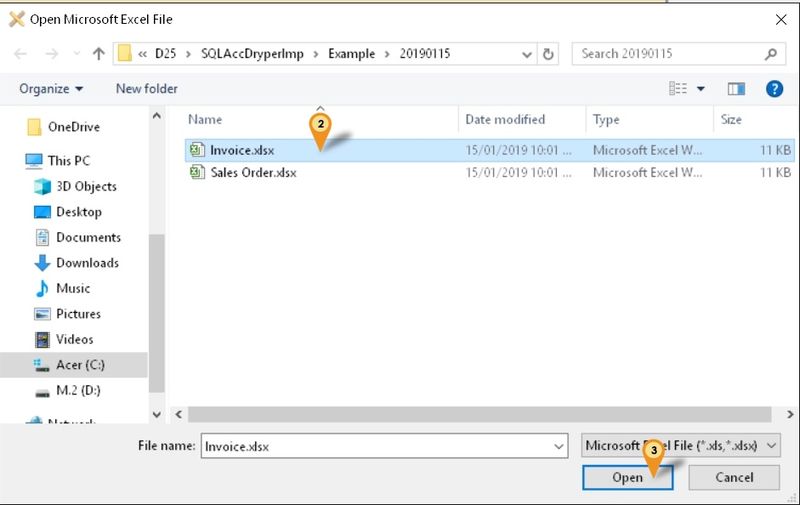
-
Select the File file wanted to import
-
Click Open
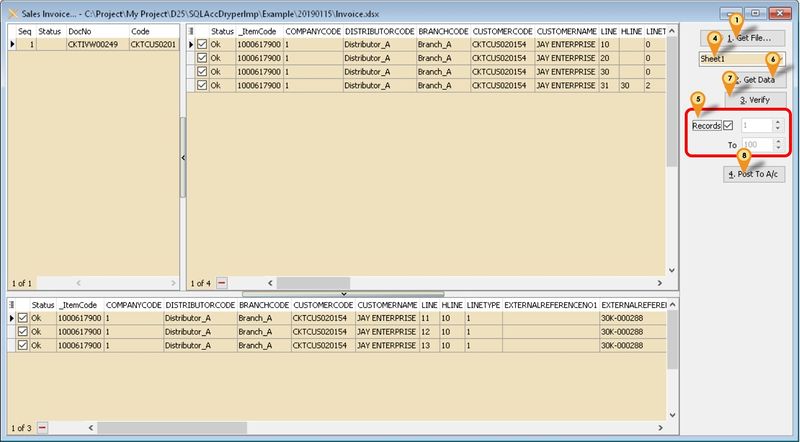
-
Select the Excel Sheet (if more then 1)
-
Set No of record to Load (only available for Registered user)
-
Click 2. Get Data button
-
Click 3. Verify button
-
Click 4. Post To A/c button
Customer Credit Note - Export (Dryper Setting)
Menu: Customer | Customer Credit Note - Export...
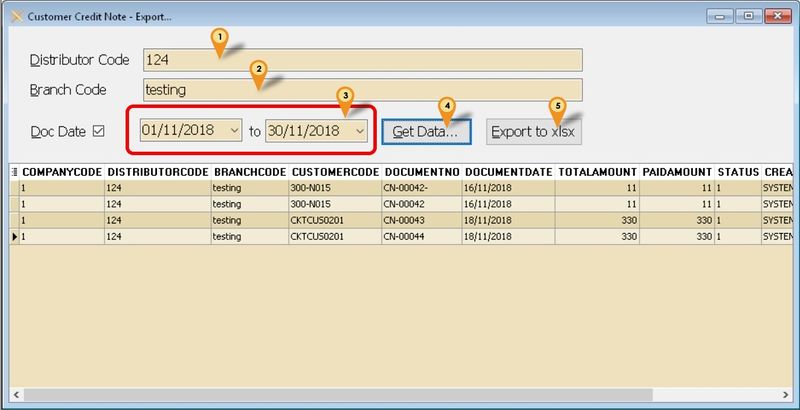
- Enter the Distributor Code (Provided by Dryper)
- Enter the Branch Code (Provided by Dryper)
- Select Range Date To export
- Click Get Data... to get the Data from SQL Accounting
- Click Export to xlsx to export out
FAQ (Dryper)
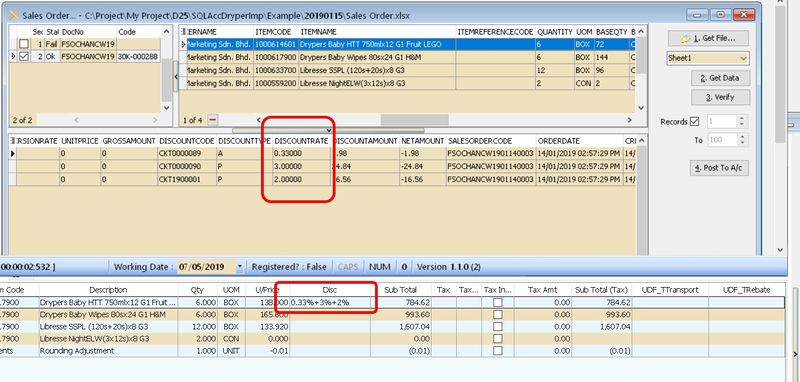
How it look like if Dryper had 3 level of discount?
Once Import it will look like below
SLPH
Is External Shareware Program which Convert Sales to Purchase Module or vice versa which exported from SQL Accounting Normally is use to Export Data From SQL Accounting Database A from Document Type A (Eg Sales Invoice) & Import to SQL Accounting Database B as other Document Type (Eg Purchase Invoice)
Limitation (SLPH)
- Only support 1 Company Code (i.e. 1 batch 1 Company Code)
- Both Source & Target must had Same Itemcode
Import Program (SLPH)
- Version (5.2.1.10) - 20 Aug 2025
- Download Link
- MD5 :
7ECC58CCBA8B04A00E2F5582D234CE14
History New/Update/Changes (SLPH)
--Build 10--
-
Fixed Tax Code empty after verify.
-
Fixed TaxInclusive not Import. --Build 9--
-
Fixed Get File no records when in SQL Connect. --Build 8--
-
Fixed Get File Error due to SEQ field. Add Get User Guide... Option. --Build 7--
-
Upgrade to Version 5.2.1.
-
Enable Quick Customise Layout for Grid.
-
Empty Item Code should by pass from Verify.
-
Allow User Override Header Description.
-
Enable Support Unicode --Build 6--
-
Fixed Import Sales/Purchase CN & DN Error. --Build 5--
-
Upgrade to Version 5.2.
-
Add Option Use My Maintain Supplier/Customer Information for Sales/Purchase Import.
-
Enable support Running In Windows Limited User. --Build 4--
-
Fixed Shown TaxCode Even Original no TaxCode. --Build 3--
-
Fix TaxRate Not Import
-
Fixed Import Customer/Supplier prompt bad variance type. --Build 2--
-
Enable Support Version 5 SQL Accounting
-
Add Maintain Tax --Build 1--
-
Fix unable to register Database
Setting (SLPH)
In SQL Accounting (SLPH)
- May refer to Point 2 at Things To Consider Before Import/Post
- Make sure this option is Tick under Tools | Options | Customer
- Perform Tax/Local Amount Rounding
In SLPH Import
Menu : Tools | Maintain Tax
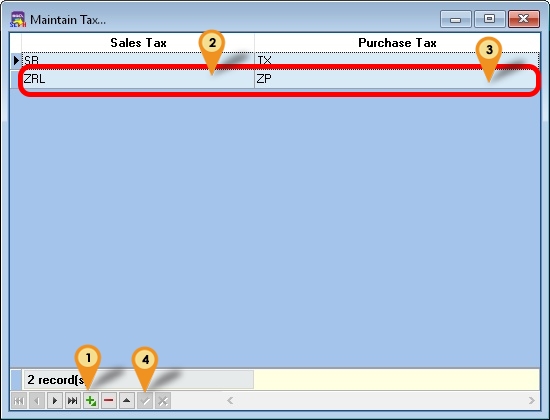
- Click New/Edit to Insert or update
- Select Sales Tax Code
- Select Purchase Tax Code
- Click Post/Save
Steps (SLPH)
Menu : Purchase | Purchase Invoice... Below steps is example to import Purchase Invoice
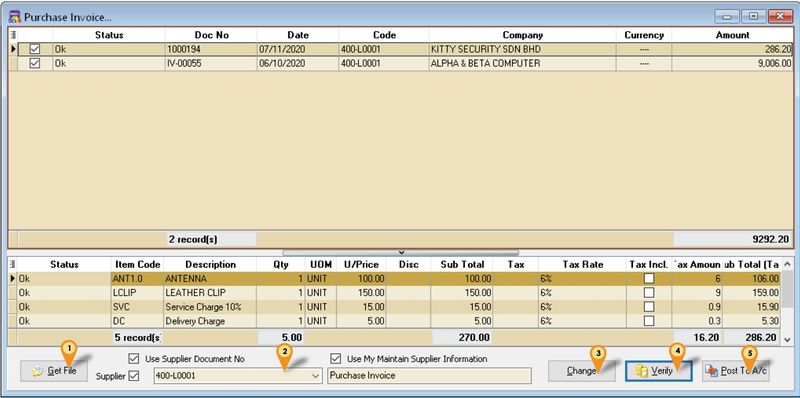
- Click Get File button
- Select Supplier Code to update
- Click Change Button
- Click Verify button
- Click Post to A/c Button
| Option | Description |
|---|---|
| Use Supplier Document No | Tick : Will follow DocNo in the XML UnTick : Auto Assign New Document Number In SQL Accounting |
| Use My Maintain Supplier Information | Tick : Will follow Maintain Supplier Information UnTick : Will follow Document Supplier Information |
| Purchase Invoice (Below Use My Maintain Supplier Information Option) | Empty it : Will follow Document Header Description With Value : Will follow the value entered in this field for Header Description |